My Tasks view: turn assigned work into today's plan
Drifta is an iPhone task app for ADHD that gives every task its own time window.
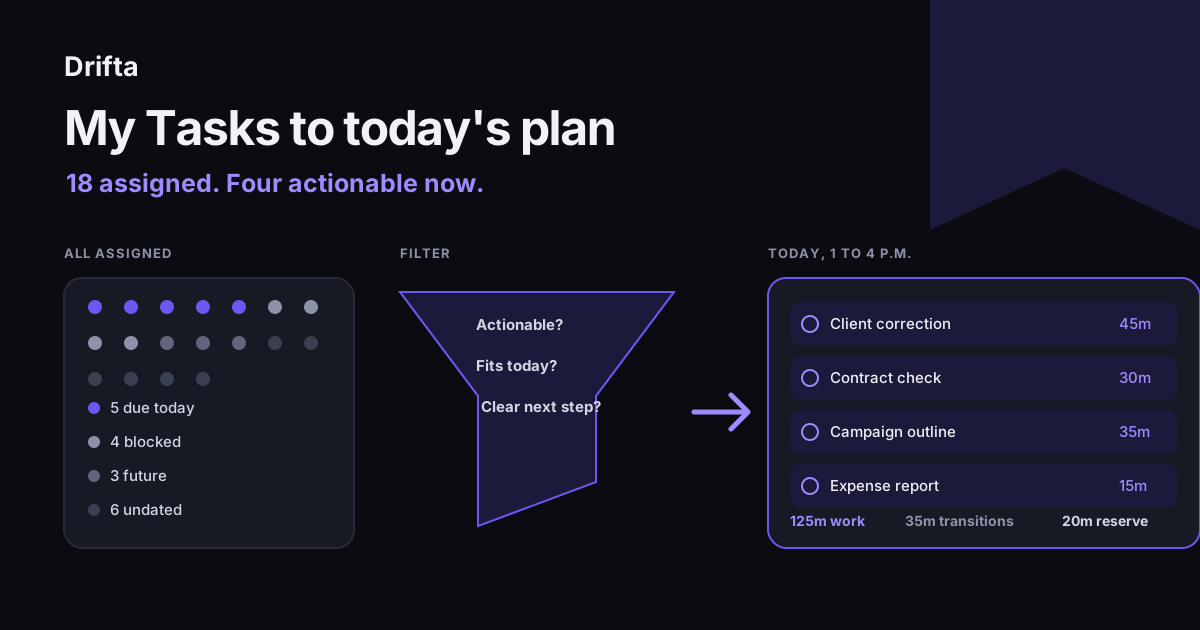
A My Tasks view gathers work assigned to you. Treat that complete view as an inbox, then build today's plan by reviewing new assignments, identifying blockers, separating future work, and choosing only the tasks that fit today's available time. Keep ownership in the shared task manager while using a smaller personal view for execution.
A My Tasks view gathers work assigned to you. Treat the complete view as an inbox, then make a workable day by reviewing new assignments, marking blockers, separating future tasks, and choosing only the actions that fit the hours you control. Keep project status in the shared task manager; use the smaller daily view to decide what you will do next.
Search results for "my tasks" point heavily to personal assignment views inside work-management apps. The common promise is useful: stop opening every project to find your work. The remaining job is turning that aggregate into a plan.
What should a My Tasks view contain?
A My Tasks view should contain every open task assigned to you across the projects covered by that system. It needs enough project context to explain the work, plus fields for status, due date, and blocker when the team uses them.
Asana's help center calls My Tasks an "individual to-do list" that automatically gathers assignments across projects. Its current documentation offers list, board, and calendar formats, which gives the same underlying assignments three views. The task count stays the same while each layout highlights different relationships.
The aggregate is still valuable. New work has one arrival point, and a missing assignment is easier to spot. Treat Recently Assigned or its equivalent as an inbox that needs processing, then leave each task attached to its original project so coworkers can see the same status.
How do you process new assignments without rereading everything?
You process new assignments by checking only what changed, then making one decision per new task. Confirm that you own it, rewrite vague wording, identify any dependency, and decide when it becomes actionable.
- Open the new-assignment section rather than the complete list.
- Return anything assigned to the wrong person.
- Rewrite "Launch prep" as the next visible action, such as "Draft the launch checklist."
- Mark the task blocked if a file, decision, or person is missing.
- Give actionable work a real start condition or review date.
Do not copy full project descriptions into a second app. A personal task can say "Draft the launch checklist after Priya approves scope" and link your attention back to the shared record. That keeps the owner and status visible to the team without maintaining two versions of the project.
How do 18 assigned tasks become a four-task day?
Eighteen assigned tasks become a four-task day by removing work that cannot move today, then pricing the remaining actions in minutes. Start with five tasks due today, four blocked tasks, three future tasks, and six undated tasks.
| Group | Count | Decision |
|---|---|---|
| Due today | 5 | Estimate and choose |
| Blocked | 4 | Record dependency, then hide from execution |
| Future start | 3 | Leave for later |
| Undated | 6 | Choose one or schedule a review |
| Total | 18 | Four enter today's plan |
Suppose today's open window is 1 p.m. to 4 p.m., or 180 minutes. Choose a client correction for 45 minutes, a contract check for 30, a campaign outline for 35, and one undated expense report for 15. The work totals 125 minutes. Add 35 minutes for switching and follow-up, leaving a 20-minute reserve.
The fifth due-today item needs 60 minutes and cannot fit. Update its owner or requester before starting the first task. Hiding that conflict until 3:40 p.m. does not create more time. Using recorded time to estimate tasks makes this review faster after a few repetitions.
What should you do with blocked tasks?
Blocked tasks should keep their shared owner and context while leaving the active execution view. Record the missing input in plain language, name who has the next move, and add a date for checking again.
"Waiting" alone is too vague. Write "Waiting for legal to approve clause 8; check Friday at 10 a.m." The task now carries a person, a dependency, and a review point. If your app supports a blocked status or section, use it. If it does not, a consistent label is enough.
Some tasks look blocked because the first action is unclear. Before moving one out, use the test for a task you want to do but cannot start. "Prepare report" may only need to become "Open last month's report and duplicate the file."
Should My Tasks reset every morning?
My Tasks should preserve the full assigned record, while a smaller daily selection can reset every morning. Microsoft Support says its My Day smart list resets nightly and returns unfinished items to Tasks, where they can appear in suggestions the next day.
That blank slate can reduce carryover noise. It can also hide a pattern if you add the same seven tasks every morning and finish two. Track the repeated misses. A task that returns for four days may need a smaller next action, a wider time window, or a conversation about capacity.
A personal reset must never erase the shared task or its status. The daily view answers what you intend to touch. The team view answers what you own and what others can expect.
How do time windows improve a personal task view?
Time windows improve a personal task view by separating assigned work from work you can act on now. A task may belong to you all week while remaining unavailable until a meeting ends, a store opens, or another person delivers a file.
A time window pairs an earliest start with a later boundary. In Drifta, a task can stay quiet before that earliest start, then surface during its actionable window. Daily Tasks, Up Next, and Backlog provide a smaller personal layer, while the shared work manager remains the source of project truth.
Platform fit matters. Drifta is iPhone-only and stores tasks on the device. A team that needs shared editing, reporting, or web access still needs its work-management system. These eight task-app questions help separate personal execution needs from team coordination needs.
What should you update before ending the day?
Before ending the day, update the shared status of anything you finished, blocked, or renegotiated. Then choose tomorrow's first review point, close the personal daily list, and leave new assignments for the next planned pass unless they are genuinely urgent.
Use two numbers for a quick check: tasks touched and tasks meaningfully advanced. Opening six records may produce only two real moves. That is still useful evidence. It shows whether the daily view is pointing at action or merely inviting you to inspect the whole workload again.
The 18-task example ends with four planned actions, 125 minutes of work, 35 minutes of transition time, and 20 minutes held back. Those numbers make the tradeoff visible before the afternoon begins.
Common questions
What is a My Tasks view?
A My Tasks view is a personal collection of work assigned to you across projects or lists. The exact name varies by app. It is useful for finding ownership in one place, but it still needs filtering by actionability, timing, and capacity before it can serve as a daily plan.
Should My Tasks include work with no due date?
Yes. Assigned work without a due date still needs review because it may be actionable, blocked, or waiting for a scheduling decision. Keep it visible in an undated or review section, then give it a start condition or return it to the project owner for clarification.
How often should I review My Tasks?
Review new assignments once near the start of the workday and once before stopping. The morning pass chooses today's work. The closing pass records blockers, updates shared status, and protects tomorrow from surprises. Constant checking can turn the view into another source of interruption.
Can a personal task app replace a team task manager?
Usually no. The team system remains the shared record for owner, status, project context, and handoffs. A personal app can hold your next action and timing, but duplicate details will drift. Keep one shared source of truth and copy only what helps you execute.
This article shares practical organizing ideas. It is not medical advice. For diagnosis or treatment questions, talk with a qualified clinician.