iPhone task app for ADHD

Dismissed the reminder. Forgot the task?

Drifta is an iPhone task app for everyday follow-through. Keep home and work tasks in view, give each a realistic time window, and see what you finish.

Drifta is an iPhone task app that uses actionable time windows rather than fixed alarms.

Free to start. Pro is optional. No ads or tracking in the iPhone app.

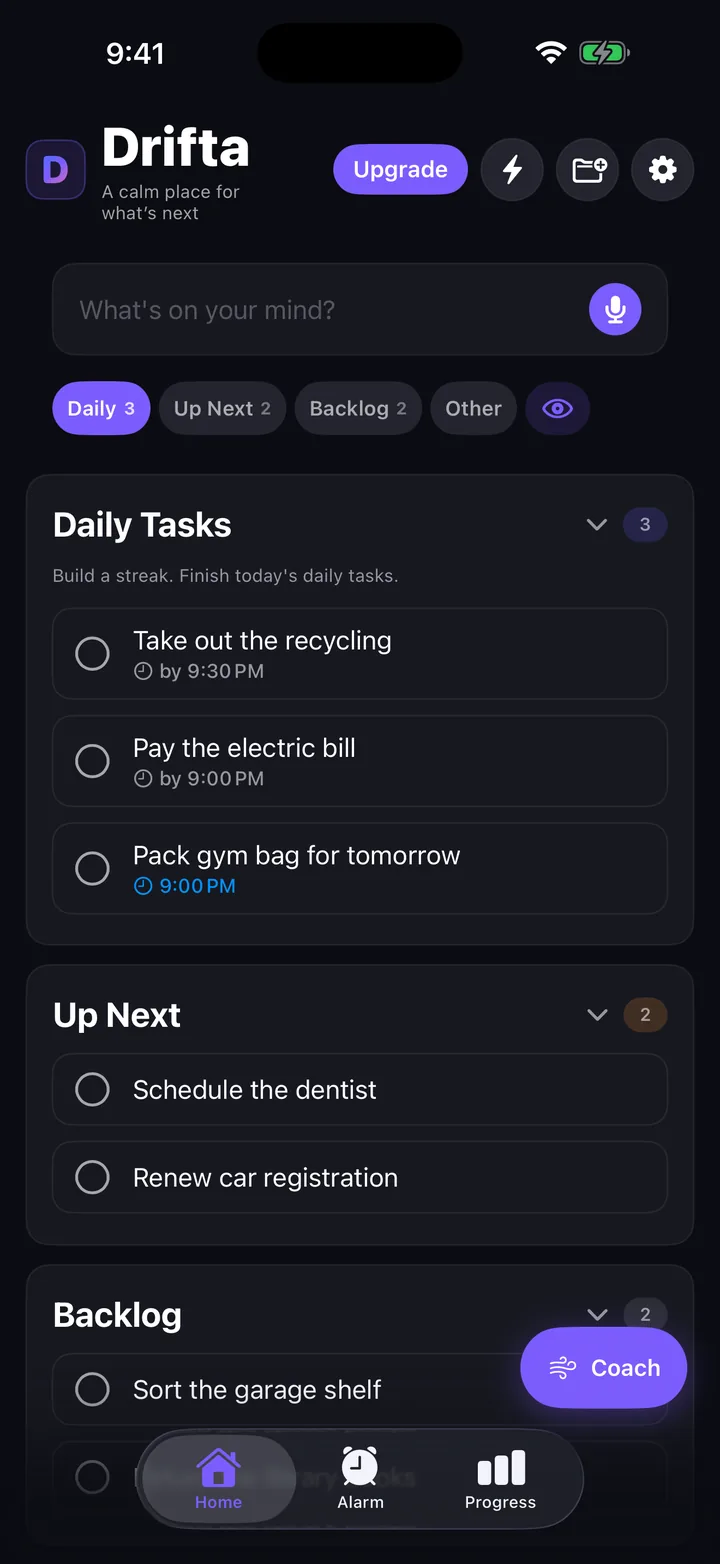
Drifta home screen with Daily Tasks, Up Next, and Backlog. Each daily task shows the time it opens or the time it is due.

8 best ADHD and iPhone task apps, ranked by workflow fit.

Comparing an app for ADHD, an app for organizing tasks, or an iPhone to-do app starts with the workflow that keeps failing. There is no universal winner, so compare ADHD planner apps by workflow fit.

  1. Drifta: best for flexible tasks that need an earliest start, a deadline, and quiet hours.
  2. tiimoapp.com: best for seeing the day as a visual timeline with a focus timer.
  3. todoist.com: best for capturing tasks quickly with natural-language Quick Add reminders.
  4. ticktick.com: best for a Constant Reminder that repeats until a task is complete.
  5. structured.app: best for dropping tasks into one guided daily timeline.
  6. Apple Reminders: best for built-in iPhone lists, tags, and location-based reminders.
  7. Things 3: best for a calm Today list and tasks that appear later without a subscription.
  8. Due: best for reminders that repeat when one alert is too easy to miss.
Eight ADHD and iPhone task apps compared by the workflow each one supports.
Ranked appReminder modelPricePlatform
1. DriftaPer-task time window with quiet hoursFree, or $4.99/mo ($29.99/yr) for ProiPhone only, no analytics or trackers, tasks stored on device
2. tiimoapp.comVisual timeline schedule with a focus timerFree version, plus a paid Tiimo Pro planiOS, iPadOS, watchOS, Android & Web
3. todoist.comNatural-language reminders added via Quick AddFree plan, plus paid Pro and Business plansiPhone, iPad, Android, Mac, Windows, Linux, Apple Watch
4. ticktick.comConstant Reminder repeats notifications until you complete the taskFree version, plus a paid Premium upgradePhone, computer, tablet, and watch with real-time sync
5. structured.appGuided daily timeline, tasks dropped directly onto itFree tier availableiPhone, Web, Mac, Apple Watch
6. Apple RemindersBuilt-in lists, tags, and location-based remindersFree, with no paid tieriPhone, iPad, Mac, Apple Watch, synced through iCloud
7. Things 3Today list and a When field that makes tasks appear laterOne-time purchase per platformMac, iPhone, iPad, Apple Watch, Vision Pro
8. DueAuto Snooze repeats five times by default, configurable up to ten$7.99 for iOS or $14.99 for MaciPhone, iPad, Apple Watch, Mac

Best task list and to-do app for iPhone: what to check.

Drifta is an iPhone to-do list app for ADHD. It sorts tasks into three lists, Daily Tasks, Up Next, and Backlog, and gives each task its own time window, so reminders wait until the task can actually be done. A Home Screen or Lock Screen widget shows what is open at a glance. Drifta is free to start, with Pro at $4.99/mo ($29.99/yr).

Quick answers.

What's the best task list app for iPhone?

The best task list app for iPhone depends on what breaks your current system: capture, deciding what matters, or remembering at the right moment. Drifta is an iPhone task app built for ADHD that gives each task its own time window, so reminders arrive when you can actually act on them instead of firing all day.

What's the best to-do list app for ADHD?

A good ADHD to-do list app needs to hold tasks quietly until they're actionable and remind you at the moment that actually matters, not just at a fixed time. Drifta does this with per-task time windows, quiet hours, and a short daily list capped at what you can realistically finish. It's free to try on iPhone.

What's the best to-do widget for iPhone?

A good one works from a glance. Drifta's to-do widget for iPhone shows your Daily Tasks, Up Next, and Backlog lists on the Home Screen and Lock Screen at a glance, so you can check what's open without unlocking into the app.

What's the best app for organizing tasks?

Organizing tasks well means separating what's due today from what can wait, without losing track of either. Todoist has Today and Upcoming views, and TickTick has Today, Tomorrow, and Next 7 Days smart lists. Drifta splits tasks into three lists, Daily Tasks, Up Next, and Backlog, and adds a real time window to each task so the list stays realistic instead of growing forever.

What is the best ADHD reminder app?

There's no single best ADHD reminder app, since the common ones each use a different alert style. Drifta gives every task a time window with an earliest start and a deadline, stays quiet in between, adds quiet hours overnight, and nudges every 15 minutes while the window is open; it's free on the Free plan or $4.99/mo ($29.99/yr) for Pro. structured.app uses a guided daily timeline with tasks dropped directly onto it. ticktick.com repeats a Constant Reminder until the task is completed. tiimoapp.com visualizes the day as a timeline with a built-in focus timer. todoist.com relies on natural-language reminders added via Quick Add.

What's the best ADHD task management app?

The best ADHD task management app depends on what's actually failing: capture, deciding what matters, or remembering at the right moment. Drifta gives every task a time window with an earliest start and a deadline, plus quiet hours overnight, so reminders wait for the window instead of firing all day. structured.app uses a guided daily timeline with tasks dropped directly onto it. ticktick.com repeats a Constant Reminder until the task is completed. tiimoapp.com visualizes the day as a timeline with a built-in focus timer. todoist.com relies on natural-language reminders added via Quick Add.

What's a good ADHD to-do list app?

Drifta is an iPhone to-do list app built specifically around ADHD time blindness: each task gets an earliest start time and a deadline, reminders wait for that window, and quiet hours stop notifications overnight. Tiimo (tiimoapp.com) takes a different approach, visualizing the day as a timeline with a built-in focus timer, if a list is less useful to you than seeing the day laid out.

What's a good app for ADHD?

Drifta is an iPhone task app for ADHD with per-task time windows, reminders that wait for the window, quiet hours, and a focus timer. What sets it apart from a typical reminder app is that every task gets its own time window plus quiet hours, instead of one fixed reminder time that fires whether or not you can act on it.

One task, one window.

Most reminders fire when you set them, not when you can act. In Drifta a task has an earliest time and a done-by time. Outside that window it leaves you alone.

Try the example at a different time.

Illustration only. No task is saved and no reminder is sent. The example uses a noon-to-5 PM window and 10 PM-to-7 AM quiet hours.

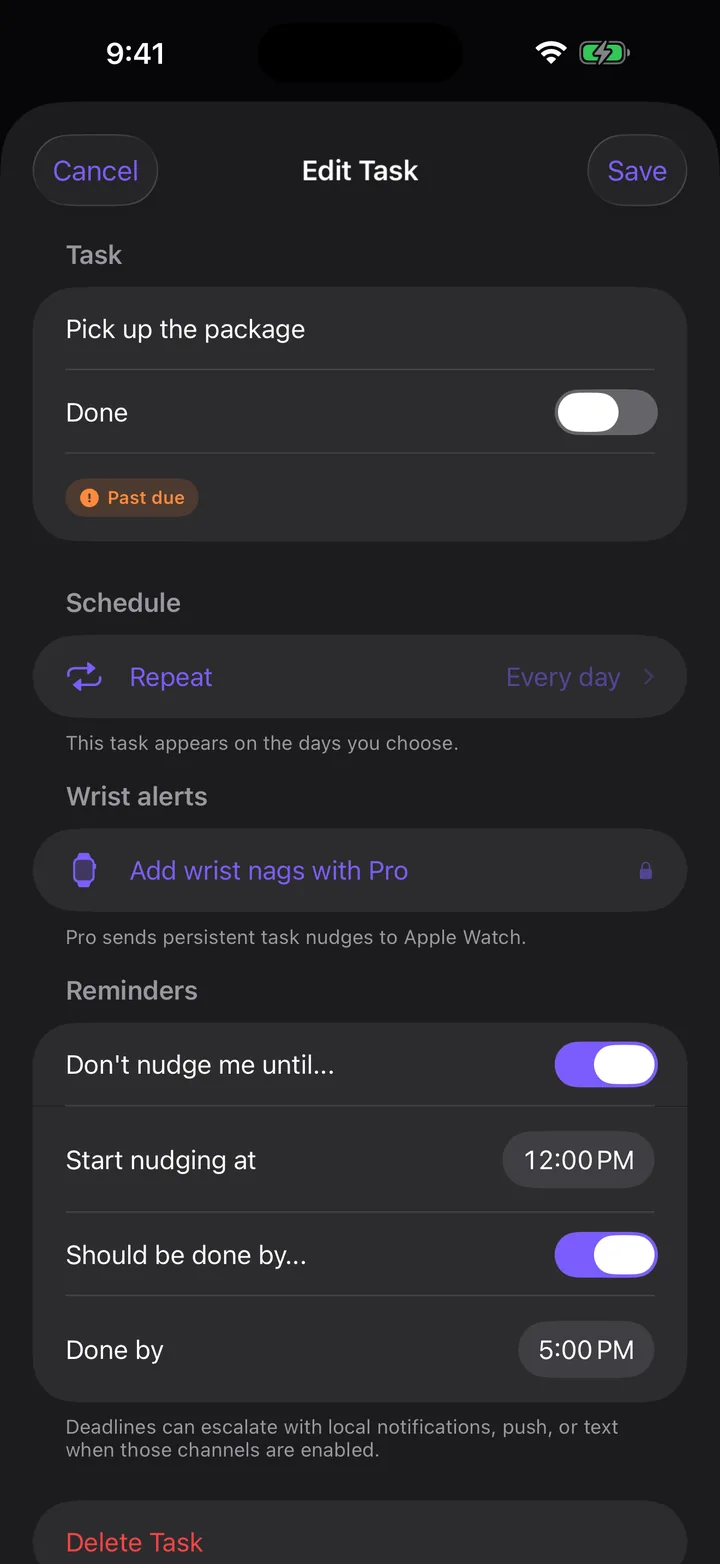
Before the window. The package task waits until noon.

  • Before noonNothing. The pickup counter is closed, so the task can't help you yet.
  • 12 to 5 PMA nudge when the window opens, then a check-in every 15 minutes until you mark it done or snooze.
  • After 5 PMThe tone gets firmer. If it truly cannot slip, Pro can keep nudging every 5 minutes.
  • 10 PM to 7 AMQuiet hours. Change them to whatever your nights look like.
Drifta Edit Task screen for Pick up the package, with Start nudging at set to 12:00 PM and Done by set to 5:00 PM.

The rest is there when you need it.

These are the actual screens from version 1.7, not mockups.

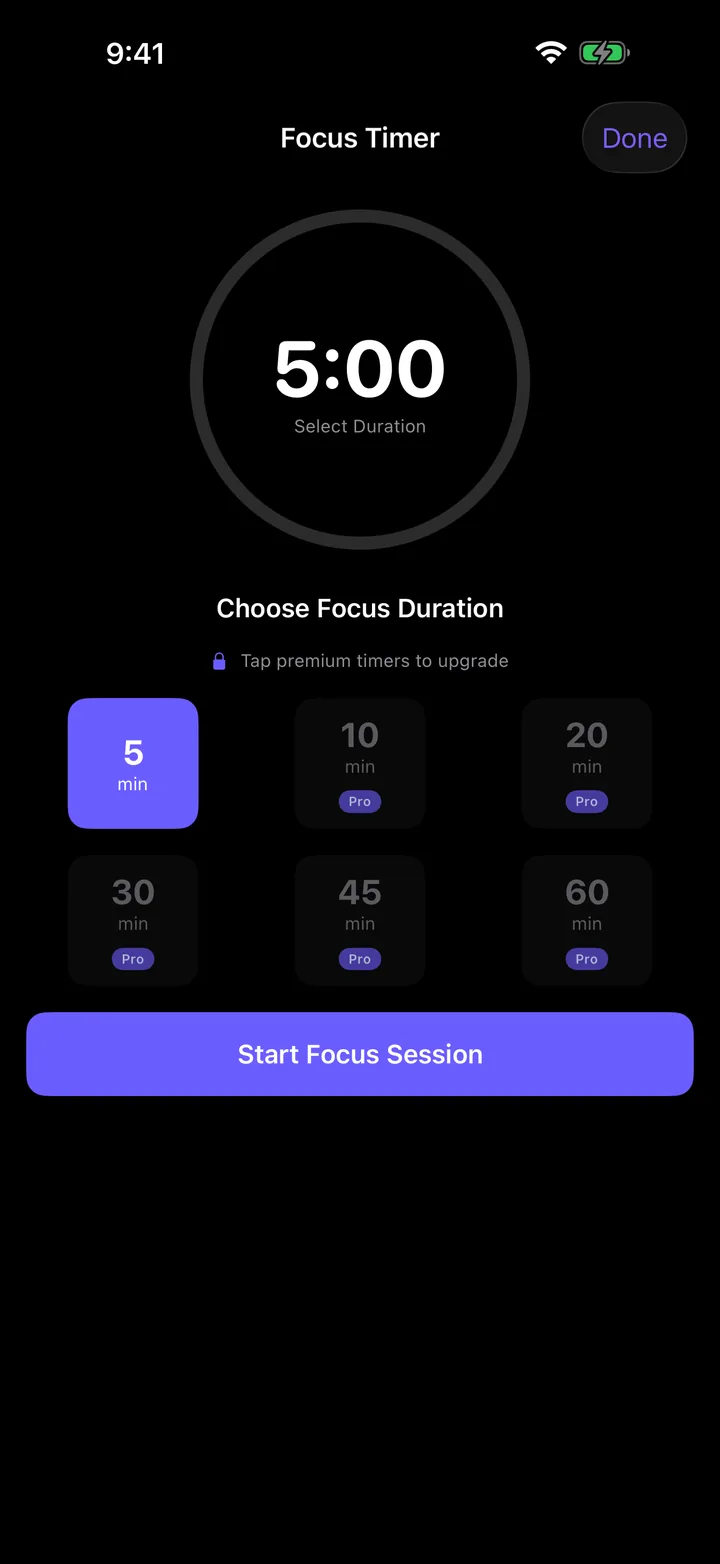
Drifta Focus Timer set to five minutes, with longer durations marked Pro.
A five-minute startWhen starting is the hard part, run a short focus timer. Pro adds 10 to 60 minute sessions.
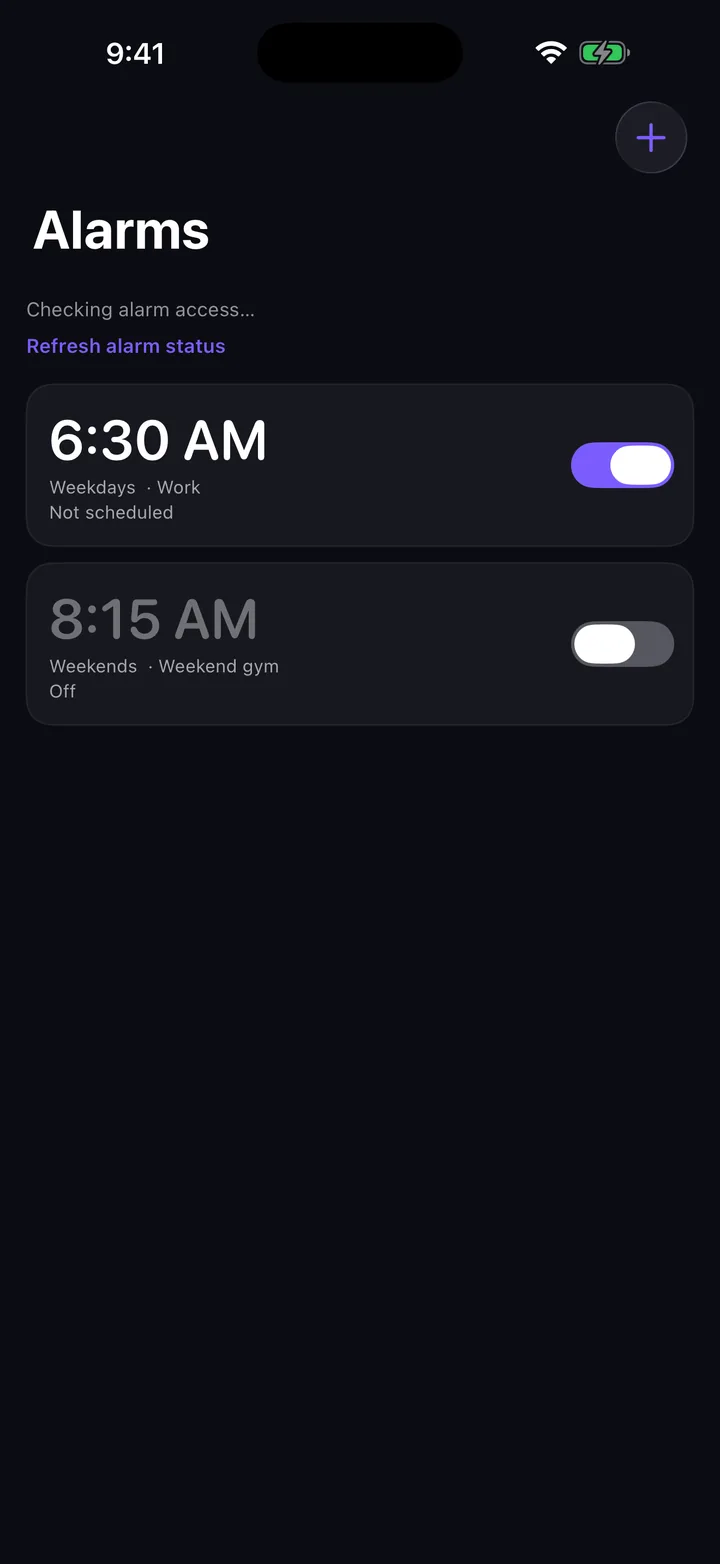
Drifta Alarms screen with a 6:30 AM weekday alarm turned on and an 8:15 AM weekend alarm turned off.
Alarms that get throughOn iOS 26 or later, wake-up alarms use Apple's system alarm, so they sound in Silent mode and Focus.
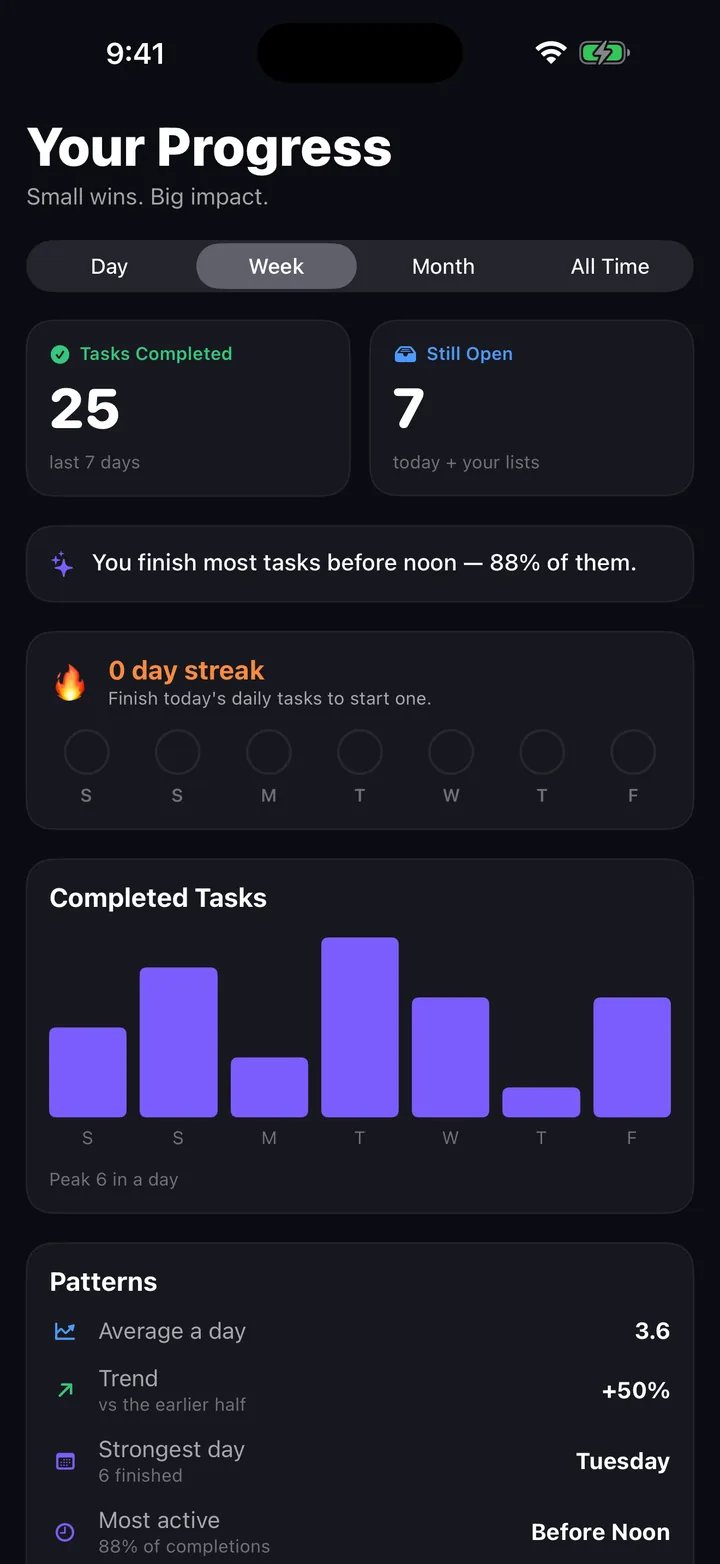
Drifta Your Progress screen showing tasks completed this week, a daily bar chart, and patterns such as strongest day.
Proof you did thingsCompleted tasks, your streak, and the time of day you tend to finish. Sample data shown.

Moving from another task app?

Start with one task you can actually do today. Keep your old list as a reference while you try Drifta.

  1. Choose the next action. Copy it manually into Drifta. Keep useful details in the task rather than moving your whole backlog at once.
  2. Give it a realistic window. Tap the task to open “Edit Task”, then find the reminder controls. Turn on “Don’t nudge me until…” to set “Start nudging at”, then “Should be done by…” to set “Done by”. For a one-time task, check the “Complete by” date too. Keep done-by at or after the start, tap “Save”, then reopen the schedule to check your times.
  3. Try one reminder on your iPhone. Allow notifications and check your quiet hours. Phone settings such as Focus can affect delivery. Mark the task done when you finish.
  4. Move the next useful task. Review what helped before copying more. Keep the original app and its records until you have checked the tasks you need.

This is a manual move. The steps do not connect to another app, import a file, or keep two lists in sync.

Download the first-task checklist (.txt)

Try Drifta on iPhone · Get help with your first task

Start free. Keep what helps.

The free version is a working task app, not a demo. Pro removes the limits and adds the parts that cost money to run.

Free
$0
  • Up to 10 daily tasks
  • Daily Tasks, Up Next, and Backlog
  • Time windows on any task
  • Quiet hours
  • Five-minute focus timer
  • Three voice captures

Free templates you can use today.

Editable spreadsheets with fictional examples, visible formulas, and no signup gate.

Grocery shoppingOrganize items, quantities, estimated prices, and what is already in the cart. Task planningChoose a full task tracker or a focused daily task spreadsheet.

A note from the maker

Why I built this.

I'm Logan. I have ADHD. I have tried every productivity app. Most of them assume you'll open them, plan your day, and stick to that plan. My brain has never done that on purpose.

The two things that actually help me: knowing a task can't be done yet so I'm allowed to ignore it, and being nudged when it's actually time. Every other app forgot one or the other. So I built the one I wanted, kept it warm, kept it quiet at night, and shipped it.

If it helps you, great. If you have notes, send them. support@drifta.app.

Questions people ask.

What if I miss the nudge?

Drifta checks in again every 15 minutes while the task's window is open. After the deadline the tone gets firmer. With Pro, a task you mark as one that cannot slip can keep nudging every 5 minutes until you tap done or snooze.

Will it keep nagging me forever?

No. Quiet hours stop everything between 10 p.m. and 7 a.m. by default, and you can change the hours. Mark the task done or snooze it and the nudges stop.

Does it work without internet?

Yes. The task list, timer, time windows, and local nudges work on the phone. Coach, optional server push, subscription checks, and optional SMS reminders need a connection.

What data does Drifta collect?

The iPhone app has no analytics, trackers, advertising IDs, or data sales. Your tasks live on your device. This public website offers separate optional PostHog analytics through footer Privacy settings. Coach only runs after you agree to share the conversation and task context with Anthropic through Drifta's server, and you can turn that off in Settings. Optional server push and SMS send only the delivery data they need. See the privacy policy for details.

Is the free version actually usable?

Yes. Up to 10 daily tasks, Up Next and Backlog lists, time windows, quiet hours, three voice captures, and a five-minute focus timer. Pro removes the limits and adds Coach conversations, custom lists, custom recurrence, longer focus sessions, Apple Watch, and optional SMS reminders.

Does it have alarms?

Yes. On iOS 26 or later, wake-up alarms use Apple's system alarm support once you allow alarm access, so they sound in Silent mode and Focus. On earlier iOS versions Drifta falls back to notification reminders, which Silent mode and Focus can quiet.

Does it have a widget or work with Siri?

Yes. A Today widget shows your tasks on the Home Screen or Lock Screen. With Siri and the Shortcuts app you can add a task, complete or snooze one, ask what to work on next, or start a focus timer.

Why iPhone only?

Because I'm one person and I had to pick. Apple Watch support is part of Pro. Android is on the list. If you want it, vote with an email.

What's the refund policy?

Subscriptions are billed through Apple, so refunds go through Apple too. Email support@drifta.app and I'll help you get one started.

Let the list wait until you can use it.

Add three real tasks, give each a window, and see how a quieter phone feels by Friday.

Download on the App Store