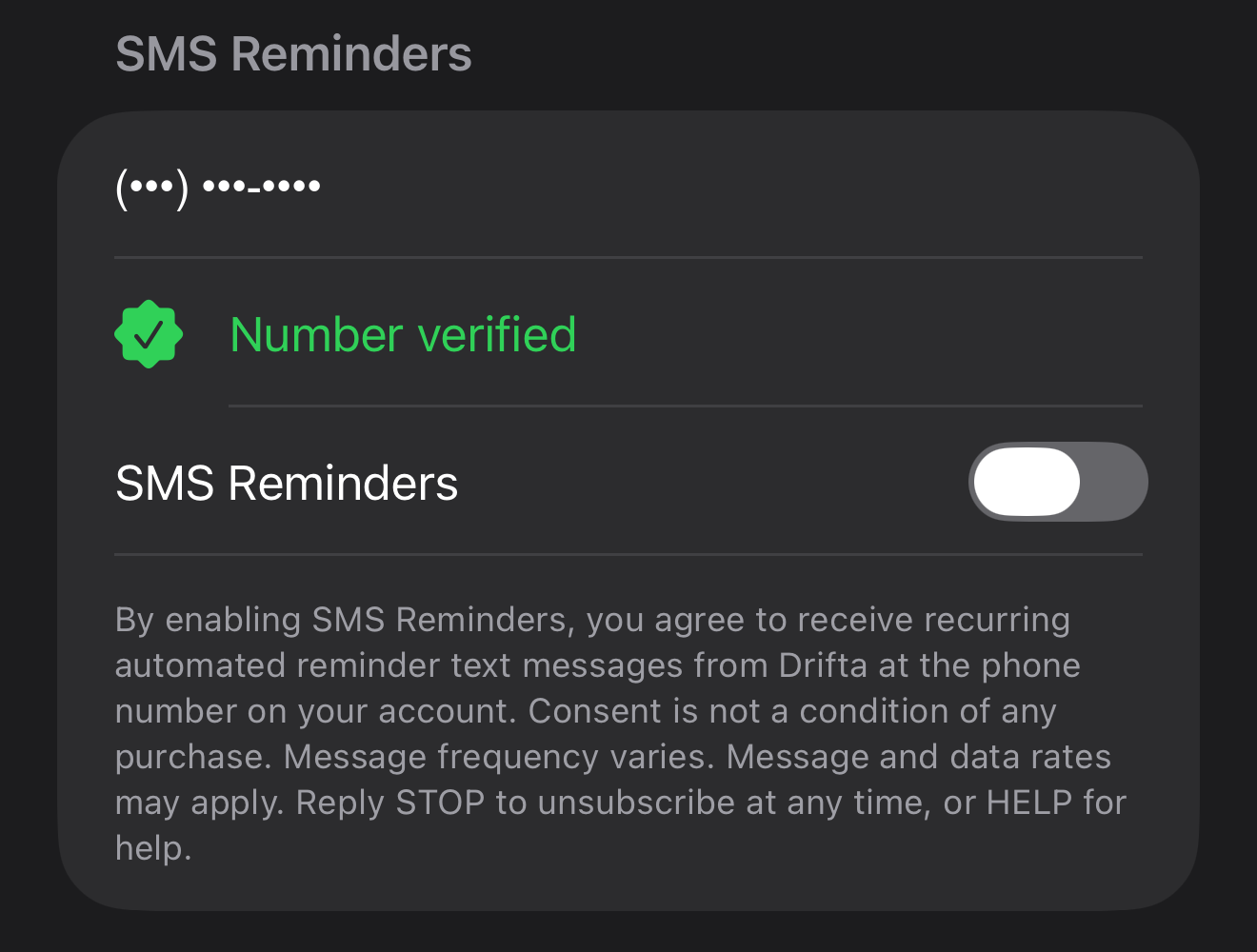
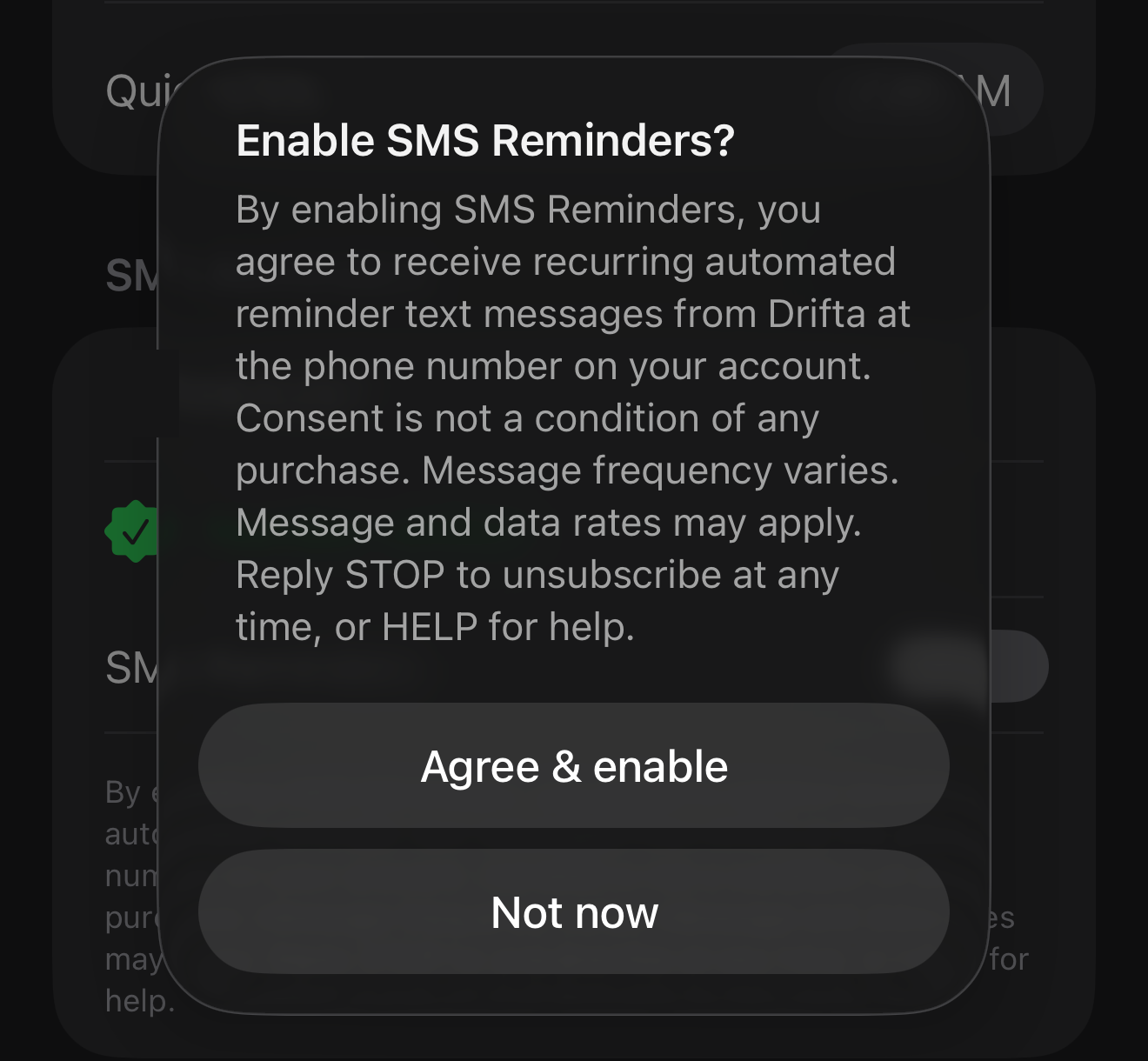
By enabling SMS Reminders, you agree to receive recurring automated reminder text messages from Drifta at the phone number on your account. Consent is not a condition of any purchase. Message frequency varies. Message and data rates may apply. Reply STOP to unsubscribe at any time, or HELP for help.
Drifta SMS Reminders
Last updated: August 6, 2026
Drifta SMS Reminders is an optional, opt-in text message program operated by Logan Moore, trading as moorecode, the developer and publisher of the Drifta iPhone app. Messages are sent under the brand name Drifta. Twilio is the messaging provider.
SMS Reminders is off by default. No text message is ever sent to you unless you personally turn the toggle on inside the Drifta app. Consent to receive text messages is not a condition of buying anything, and is not required to install or use Drifta or to subscribe to Drifta Pro.
Program at a glance
- Program name: Drifta SMS Reminders
- Sender identity: Drifta (Logan Moore, trading as moorecode). Every reminder begins with "Drifta reminder:" so you always know who sent it.
- Message types: Recurring automated reminder texts about tasks and deadlines you created yourself in the Drifta app. Informational and transactional only. No marketing, no promotions, no advertising, no third party content, no affiliate offers.
- Message frequency: Message frequency varies. Messages are recurring and depend on how many tasks you flag and how many you let go overdue. Expected volume is 0 to 10 messages per day. The program is capped at 10 messages per day per phone number.
- Cost: Drifta does not charge for text messages. Message and data rates may apply from your mobile carrier.
- How to opt in: Inside the Drifta iPhone app only, at Settings → SMS Reminders. See the step by step below.
- How to opt out: Reply STOP to any Drifta message, or turn the SMS Reminders toggle off in Settings.
- How to get help: Reply HELP to any Drifta message, or email support@drifta.app.
- Supported carriers: AT&T, T-Mobile, Verizon, US Cellular, and most US MVNOs. Carriers are not liable for delayed or undelivered messages.
How you opt in, step by step
There is no web form, no keyword campaign, and no third party list. The only way to join Drifta SMS Reminders is to turn it on yourself inside the app:
- Open the Drifta app on your iPhone. Drifta is a free download on the App Store. SMS Reminders is a Drifta Pro feature.
- Tap Settings in the Drifta app, then scroll to the SMS Reminders section.
- Enter your mobile number and tap to request a one time verification code. We text you a single code so we can confirm you control the number. This verification message is sent because you requested it.
- Enter the code to confirm the number is yours.
- Read the consent disclosure shown directly beneath the toggle. The full text is reproduced verbatim below, and is on screen in the app before you can enable anything.
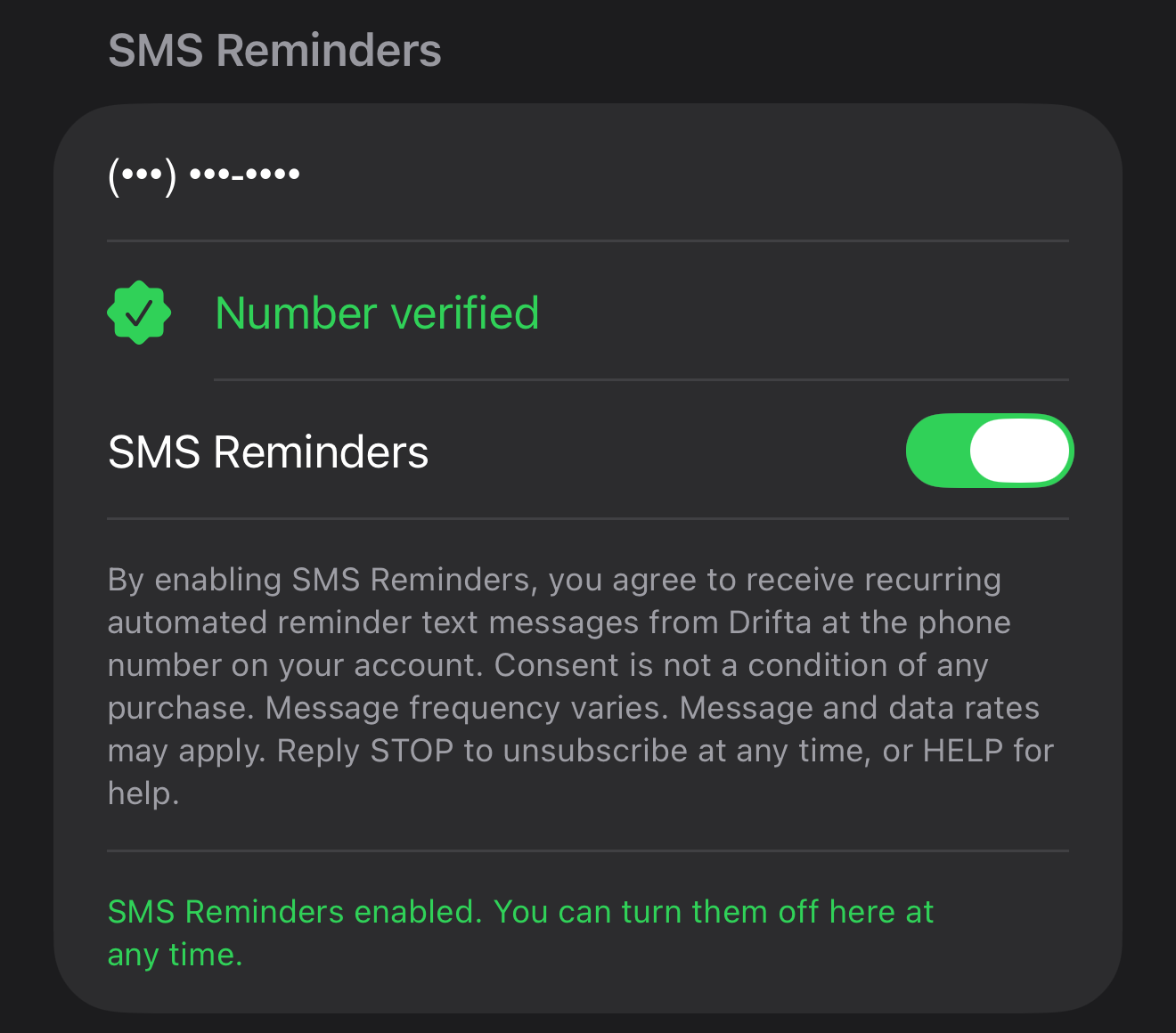
- Turn on the "SMS Reminders" toggle, then confirm with Agree & enable in the dialog that appears. The toggle is off by default. You must actively switch it on. Nothing is pre-checked, pre-selected, or enabled on your behalf, and no reminder text is sent before you do this.
You can turn the toggle back off in Settings at any time, which immediately revokes your consent and stops all further messages.
What the opt-in looks like in the app
These are captures from the Drifta iPhone app, taken on a real device. They show the complete opt-in in the order it happens. The only edit is the phone number, which is fully masked because this is a public page.
The exact consent disclosure
This is the consent language shown on screen in the Drifta app, directly beneath the SMS Reminders toggle and repeated in full in the confirmation dialog, before the toggle can be enabled. It is reproduced here word for word:
The same screen links to the Terms of Use and the Privacy Policy, which are also linked from every page of this site.
"The phone number on your account" means the mobile number you entered and verified in Settings. Drifta does not require an account or a login, and we do not obtain your number from anywhere else.
Message types and frequency
Every message in this program is a recurring automated reminder about something you put into Drifta yourself. The categories are:
- Task and deadline reminders. A short text when a task you created with a deadline goes overdue, or when a scheduled task window is about to close.
- Informational and transactional messages. The one time verification code you requested during setup, which is delivered through Twilio Verify, plus the confirmations you receive when you reply STOP or HELP.
Message frequency varies. It depends entirely on how many tasks you create and how many go overdue. Typical volume is 0 to 10 messages per day, and the program is hard capped at 10 messages per day per number. Messages are recurring for as long as the toggle is on.
Drifta never sends marketing, promotional, or advertising texts through this program, and never sends messages on behalf of anyone else.
Sample messages
These are real message templates, exactly as Drifta sends them:
- Drifta reminder: Pay electric bill was set for 3:00 PM and is still open. Reply STOP to unsubscribe.
- Drifta reminder: This overdue task still needs your attention. Reply STOP to unsubscribe.
- Drifta reminder: Please check your task list in the app. Reply STOP to unsubscribe.
How to stop messages (STOP)
Reply STOP to any Drifta text message at any time to unsubscribe. You will receive a single confirmation message and then no further messages will be sent to that number. STOPALL, UNSUBSCRIBE, CANCEL, END, QUIT, and REVOKE work the same way.
You can also turn the SMS Reminders toggle off in the Drifta app under Settings, which has the same effect immediately.
Opt-out confirmation message: Drifta SMS Reminders: You are unsubscribed and will not receive any more messages from this number. Reply START to resubscribe or HELP for help.
If you ever want the reminders back, reply START and you will get: Drifta SMS Reminders: You are re-subscribed to task reminder texts. Msg&data rates may apply. Reply STOP to unsubscribe or HELP for help.
How to get help (HELP)
Reply HELP to any Drifta text message to receive support contact information in a single reply. Replying HELP does not subscribe you to anything.
Help reply message: Drifta SMS Reminders: reminder texts for tasks you set in the Drifta app. Support: support@drifta.app. Msg&data rates may apply. Reply STOP to unsubscribe.
You can also email support@drifta.app at any time and Logan will reply directly.
Rates, carriers, and liability
Message and data rates may apply. Drifta does not charge you for text messages. Your mobile carrier's standard message and data rates apply to every message sent and received. Check your plan if you are unsure.
Delivery is not guaranteed. Carriers are not liable for delayed or undelivered messages.
Privacy of your number and your consent
Your mobile number and your SMS consent record are used only to deliver the reminders you asked for. SMS opt-in data and consent are not shared with any third party for marketing purposes. No mobile information is sold, rented, or shared with third parties or affiliates for marketing or promotional purposes.
The only party that receives your number is Twilio, our messaging provider, purely so it can deliver the message on our behalf. Full detail is in the Privacy Policy.
Terms and privacy
The full messaging terms are in the Drifta Terms of Use, and how your data is handled is described in the Drifta Privacy Policy.
Contact
Drifta is made by Logan Moore, trading as moorecode. Questions about this messaging program go to support@drifta.app.