Reminder apps for ADHD: four styles, compared
Drifta is an iPhone task app for ADHD that gives every task its own time window.
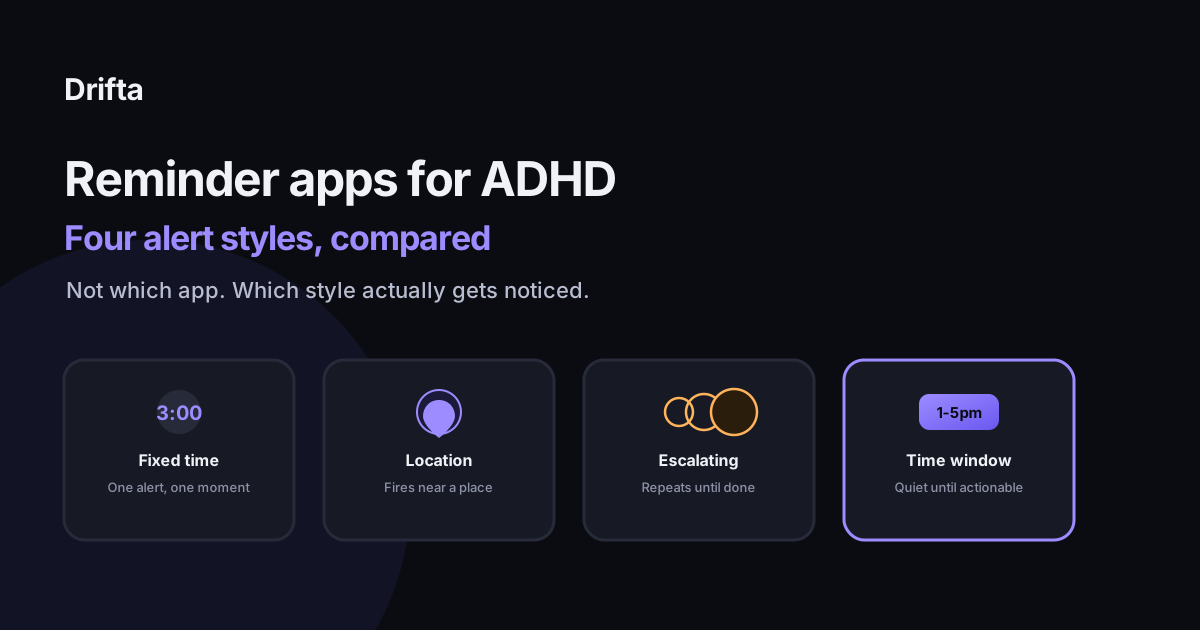
There is no single best reminder app for ADHD, because "reminder app" actually covers four different alert styles: a fixed-time ping, a location trigger, an escalating repeat, and a time window. Apple Reminders and Google Tasks lean on the first two, TickTick and Due lean on the third, and Drifta uses the fourth. Which one works for you depends on which of those four keeps failing you now.
"Reminder app for ADHD" isn't really one category of software. Strip away the branding and there are four distinct alert styles doing the actual work: a fixed-time ping, a location trigger, an escalating repeat, and a time window that only wakes up once a task is actually startable. Apple Reminders and Google Tasks are built mostly around the first two, TickTick and Due specialize in the third, and Drifta is built around the fourth. Picking a winner among app names skips the more useful question, which is which of those four styles matches the way reminders actually fail for you.
Why the app name matters less than the alert style
An estimated 15.5 million U.S. adults, about 6.0% of the adult population, had a current ADHD diagnosis in 2023, according to the CDC's National Center for Health Statistics. That's a lot of people being sold the same handful of reminder apps for what are often opposite problems. Someone who forgets to leave the house on time needs a different alert than someone who forgets an errand exists until they're already home. Comparing app store ratings won't surface that difference; comparing alert styles will.
Style one: the fixed-time alert
This is the oldest and most common style: set a time, get a ping at that time. Apple Reminders and Google Tasks both do this well and for free. The problem isn't the mechanism, it's the assumption baked into it, that you'll be free, attentive, and near your phone at the exact minute the alert fires. Psychologist Russell Barkley, who has spent decades studying ADHD as a disorder of time perception rather than attention alone, describes this as a kind of temporal myopia: the closer a moment is, the clearer it feels, and anything even a few minutes off to the side gets missed entirely. A 3:00 reminder that arrives while you're mid-sentence in a different task gets swiped and forgotten at almost the same rate as no reminder at all. Apple Reminders: the mistakes that quietly break it covers the specific habits that make this style fail more than it has to.
Style two: the location trigger
Both Apple Reminders and Google Tasks can also fire a reminder when you arrive at or leave a place, using your phone's GPS and Wi-Fi rather than the clock. This solves the fixed-time problem for anything tied to a location: "buy milk" fires when you're at the grocery store, not at 6 p.m. when you're already home. The limitation is structural rather than a bug: a location trigger can't help with the much larger set of tasks that aren't attached to anywhere specific, like writing an email or making a phone call, and it does nothing if the errand needs to happen somewhere you don't visit often enough to trip the trigger.
Style three: the escalating or recurring repeat
TickTick can repeat a reminder every few minutes until you mark a task done, and Due is built almost entirely around this idea, nagging at a set interval until you dismiss it for real. This style assumes the first alert failed because you were briefly unavailable, not because the task itself is vague or unattached to a plan. That assumption holds up better than it sounds: a 2024 meta-analysis of 642 tests on implementation intentions, the psychology term for a concrete if-then plan, found the technique works best when the plan is specific and has actually been rehearsed, not just repeated louder. A reminder that fires every ten minutes with no plan attached is mostly just louder. A reminder that fires every ten minutes with "when this buzzes, I stand up and take the first pill" attached to it works closer to what the research describes. Using an Apple Watch for task reminders with ADHD is one way to make the repeat physically harder to ignore, since a wrist tap is a different sensation from one more phone notification stacking in the tray.
Style four: the time window
Drifta takes a different approach to the same failure mode: instead of a single moment or a repeating alert, every task gets an earliest start time and a deadline, and stays quiet for the entire window in between. A task that can happen anytime from 1 to 5 p.m. doesn't need a 1:00 ping you might miss, because the window itself covers whatever moment you actually get to it. The same logic explains why text message reminders sometimes outperform push notifications for certain tasks: a channel that isn't tied to a single instant is harder to miss entirely, even if it's easier to snooze once. Drifta's own SMS reminders apply that same idea outside the app itself, for the handful of tasks that genuinely can't wait on you opening your phone.
Matching the style to the failure
| Style | Example apps | Best for | Where it breaks |
|---|---|---|---|
| Fixed-time alert | Apple Reminders, Google Tasks | Tasks with a genuinely exact moment, a call at 2:00 | You're mid-task or away from your phone at that minute |
| Location trigger | Apple Reminders, Google Tasks | Errands tied to a specific place | Anything not attached to a location |
| Escalating repeat | TickTick, Due | Tasks you keep dismissing without acting | Vague tasks with no first step attached |
| Time window | Drifta | Tasks with a range of good times, not one exact minute | Truly time-critical, single-moment events |
What actually makes an app ADHD-friendly here
What makes an app ADHD friendly beyond the label is worth reading before you pick any of the four, because the label alone tells you almost nothing about which alert style you're getting. A lot of apps market themselves as "built for ADHD" while still defaulting to a single fixed-time ping under the hood. The style matters more than the marketing copy sitting on top of it.
Combining styles instead of picking one
Most people end up mixing two styles rather than committing to one app for everything. A location trigger for errands, a time window for the rest of the day's tasks, and an escalating repeat reserved for the two or three things that truly cannot slip, medication, a bill due today, a call that has to happen before a deadline. Using more than one style isn't the mistake here; expecting a single alert type to carry every kind of task is, since the failure modes are different enough that no one style covers all of them.
Starting small
Before switching apps, it's worth testing which style is actually failing you this week. Pick three tasks you missed recently and ask what kind of alert they got: a fixed time you weren't near your phone for, a location you don't visit often, or no real reminder at all beyond a line on a list. That answer points to the fix faster than reading another feature comparison, since the four styles above cover the real space of what's available, whatever the app is called on the App Store.
Common questions
Is there one best reminder app for ADHD adults?
Not one, because the apps differ in alert style more than feature list. Someone who forgets errands needs location triggers, someone who dismisses alerts mid-task needs a window or an escalating repeat, and someone who forgets to open the app at all needs a channel outside it, like a text message.
Why do fixed-time reminders get ignored so often with ADHD?
A fixed-time alert assumes you're free and receptive at the exact minute it fires. Psychologist Russell Barkley's model of ADHD as a time-perception disorder says that assumption is exactly what tends to fail: the alert has no way to know you're mid-task, out of range of your phone, or three tasks further along than you were when you set it.
Do escalating or repeating reminders actually work better?
They work better when they're tied to a specific trigger, not just a louder alert. A meta-analysis of 642 tests on if-then planning found the format helps most when the plan is concrete and rehearsed, which is why "keep buzzing every ten minutes" alone helps less than "buzz again, and this time the plan is to just stand up."
What's the difference between a location reminder and a time window?
A location reminder fires once, tied to a place, and misses tasks that aren't attached to anywhere specific. A time window doesn't wait for a place; it gives a task an earliest start and a deadline and stays quiet everywhere in between, which covers the much larger set of tasks that aren't errands.
What are the best productivity apps for ADHD?
The best ones for ADHD tend to be task-focused rather than calendar-focused, matched to how you actually miss things: a location trigger, an escalating repeat, or a time window. Drifta uses the time-window model, giving each task an earliest start and a deadline instead of one fixed alert time.
This article shares practical organizing ideas. It is not medical advice. For diagnosis or treatment questions, talk with a qualified clinician.