To-do lists for time management: from list to day
Drifta is an iPhone task app for ADHD that gives every task its own time window.
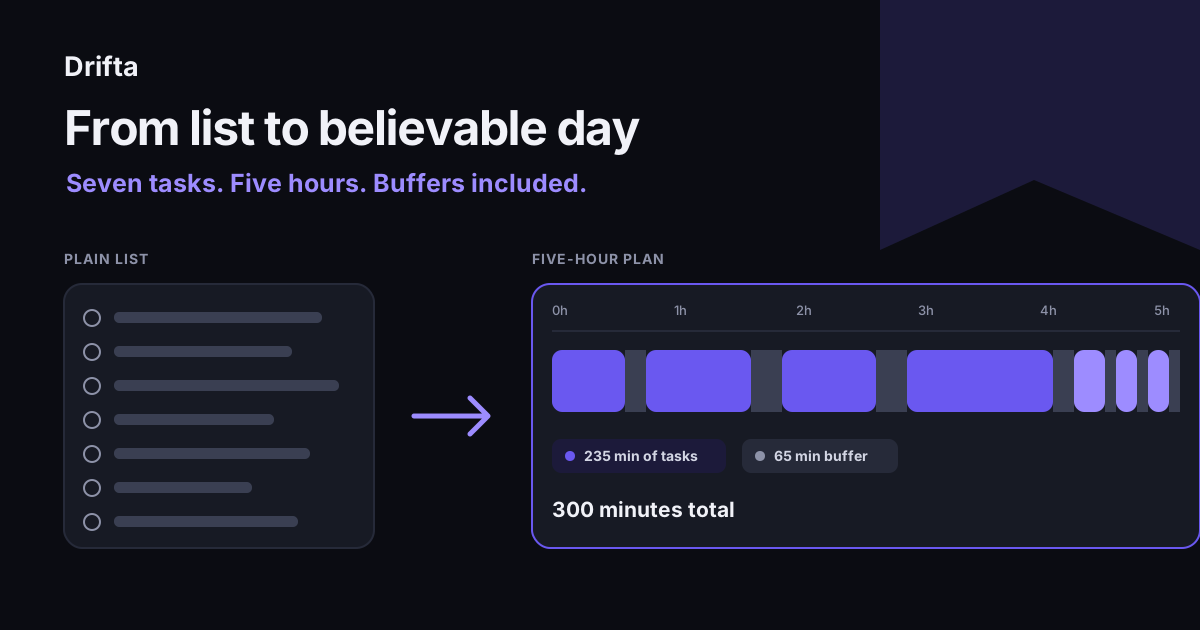
To-do lists help with time management only after each task has a duration and a place in the day. Keep a full capture list, choose a short daily list, estimate the minutes each task needs, and leave buffer between tasks. If the total exceeds your available time, move work before the day starts instead of carrying an impossible list.
To-do lists for time management work only when the list accounts for time. Keep one place for capture, choose a shorter list for today, add a realistic duration to each task, and reserve buffer for the parts between tasks. When the minutes do not fit, move an item now rather than discovering the problem at 4:40 p.m.
A plain list answers what needs doing. Time management adds three harder answers: when you can start, how long the work takes, and what loses its place when the day is full. That distinction turns a task inventory into a plan.
What does a to-do list do for time management?
A to-do list gives time management a visible set of commitments to work with. It gets unfinished work out of memory, gives each item a name, and creates a place to decide what belongs today.
Sarina Schrager, writing in the American Academy of Family Physicians' FPM journal, cited a 2011 study in which making a plan reduced or eliminated intrusive thoughts about unfinished goals. Her article also reviewed five roundups that named 34 different list apps. The large app count is a useful warning: changing tools is easy, while deciding how the work fits still belongs to you.
The same FPM article opens with Henry David Thoreau's line, "The question is, what are we busy about?" A list answers that question only when its wording is specific. "Budget" is a topic. "Email the revised budget to Ana" is a task you can estimate and finish.
What belongs on the master list and today's list?
The master list holds every open commitment, while today's list holds only the work that can fit today. Trying to make one screen serve both jobs produces a long inventory when you need a short decision.
Capture new items in one place. During planning, move only actionable work into today. Keep ideas, future errands, and tasks blocked by someone else outside the working list. If the master list keeps expanding faster than you can review it, this method for a list that keeps growing shows how to separate capture from commitment.
A grocery shopping list template illustrates the split. The reusable master list may contain 60 household staples. The trip list might contain milk, rice, soap, spinach, and coffee. Seeing all 60 products in the store would slow the useful list down.
How do you turn list items into a believable day?
You turn list items into a believable day by totaling task minutes, fixed commitments, and buffer before choosing the final list. Use rough numbers drawn from past experience. Precision to the minute is unnecessary; a visible estimate is still better than an unpriced task.
| Task | Estimate | Buffer after | Running total |
|---|---|---|---|
| Send revised budget | 35 min | 10 min | 45 min |
| Prepare 11 a.m. meeting notes | 50 min | 15 min | 1 hr 50 min |
| 11 a.m. meeting | 45 min | 15 min | 2 hr 50 min |
| Review two applications | 70 min | 10 min | 4 hr 10 min |
| Call pharmacy | 15 min | 5 min | 4 hr 30 min |
| File expense receipt | 10 min | 5 min | 4 hr 45 min |
| Order printer paper | 10 min | 5 min | 5 hr |
The work itself takes 235 minutes. Buffers add 65 minutes, so the complete list costs 300 minutes, exactly five hours. A sixth substantial task cannot enter without something leaving. This is where a task manager earns its keep: it should make the later choice easy instead of letting all tasks pose as today's work.
Why do durations need buffer time?
Durations need buffer time because the estimate usually covers the central action and forgets the edges. Opening the file, finding the phone number, walking back from the meeting room, and writing the follow-up note all consume minutes.
Start with 10 minutes between desk tasks and more when travel, setup, or another person is involved. Then compare the estimate with what happened. Making time visible can be as plain as writing "35 + 10" beside a task instead of storing both numbers in your head.
Buffer also protects the next task. If the budget email runs eight minutes long, the planned gap absorbs it. Without that gap, every later item becomes late even though the first estimate missed by only a little.
When should a task get a time window instead of a due date?
A task should get a time window when it has a sensible starting point and a later boundary, but no single required minute. "Call the pharmacy after it opens at 9 a.m. and before lunch" is a window. "Join the call at 11 a.m." is a calendar event.
A due date tells you when the consequence arrives. An earliest start keeps the task hidden before action is possible. The time-window and due-date comparison covers which field fits different kinds of work.
Drifta stores an earliest start and a separate deadline on a task. Its free version allows up to 10 daily tasks, so the five-hour example can fit as seven visible items while later work waits in Up Next or Backlog. The useful limit remains the 300 minutes available, not the number of empty rows.
How do you repair a list when the day changes?
You repair a time-managed list by recalculating from the current minute and moving work once. If a surprise call takes 40 minutes, subtract 40 minutes from the time left, protect the real deadline, and move one flexible item out.
Avoid shaving five minutes from every estimate to make the total look tidy. That creates seven small lies and no actual room. Moving the 70-minute application review to tomorrow restores more space than editing every row.
Review the result at day's end. Record only the estimates that were meaningfully wrong. After a week, recurring tasks will have usable numbers, and daily planning becomes arithmetic instead of a fresh guess.
Common questions
How many items should be on a daily to-do list?
Use the number that fits your available minutes rather than a universal item count. Three long tasks may fill a day, while eight short errands may fit easily. Add the estimated duration and buffer for every item, then stop when the total reaches the time you truly control.
Is a to-do list the same as time management?
A to-do list records work, while time management decides when that work can happen and what must wait. A useful daily system needs both: one place to capture tasks and a smaller plan that accounts for duration, fixed commitments, transitions, and the hours available.
Should every task have a due date?
No. A due date belongs on work with a real consequence or commitment. For flexible work, an earliest start or a broad time window can be more honest. Filling the list with invented due dates creates overdue noise and makes genuine deadlines harder to see.
What is the best app for a time-managed to-do list?
Choose an app that makes duration or timing visible without demanding more upkeep than you will do. Test it with one real week. Count how often you reschedule, how long daily planning takes, and whether future tasks stay out of the way until you can act.
This article shares practical organizing ideas. It is not medical advice. For diagnosis or treatment questions, talk with a qualified clinician.