ListPro: test a 14-item grocery run
Drifta is an iPhone task app for ADHD that gives every task its own time window.
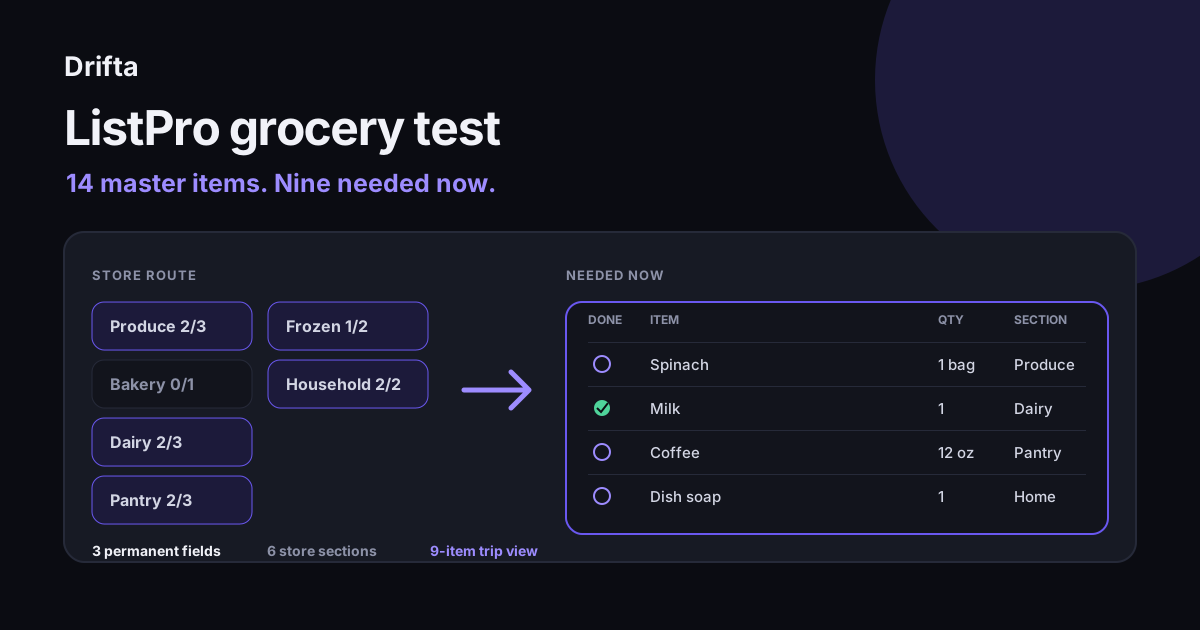
ListPro is an iPhone and Windows list-making tool for reusable checklists, shopping lists, and structured lists. Its strength is customization: Apple's current iPhone listing names more than 40 templates and seven column types. A 14-item grocery test shows the tradeoff clearly: extra fields can make one reusable list useful, but each field also needs upkeep.
ListPro is the name of a customizable list-making app for iPhone and Windows. Apple's current iPhone listing names more than 40 templates and seven column types, while Ilium Software describes lists ranging from a quick checklist to a small database. A 14-item grocery run is enough to test whether that flexibility saves effort or creates fields you will not maintain.
The search term "list pro" is thin because it is mostly navigational. This worked example stays with the named product and one ordinary job: reuse a master grocery list without dragging every pantry item through the store.
What is ListPro built to do?
ListPro is built to create reusable shopping lists, to-do lists, packing lists, reference lists, and more structured collections. Ilium Software's product page says it can range "from a quick to-do list to a complex micro-database."
Apple's current App Store listing says the product has more than 40 customizable templates, seven column types, item indenting, and access to hundreds of community-made lists. The listing also says ListPro has been used by serious list makers for more than 25 years. Those developer claims describe the product's breadth. A small list may need only two or three of those options.
A useful test starts small. Build one list you already understand, use it in the place where it matters, and count what you touched. Grocery shopping exposes scanning, reuse, quantities, categories, and completion in under an hour.
How do you set up the 14-item grocery test?
The 14-item grocery test uses four visible fields: a checkbox, item name, quantity, and store section. Keep the item field first because that is what you scan in the aisle. Quantity prevents "tomatoes" from turning into another decision beside the produce bins.
| Section | Items | Count |
|---|---|---|
| Produce | Spinach, onions, bananas | 3 |
| Bakery | Sandwich bread | 1 |
| Dairy | Milk, eggs, yogurt | 3 |
| Pantry | Rice, coffee, black beans | 3 |
| Frozen | Peas, berries | 2 |
| Household | Dish soap, bin liners | 2 |
| Total | Six sections | 14 |
Use the master-list behavior to keep all 14 items available between trips. Before this trip, mark nine as needed now: spinach, onions, milk, eggs, coffee, black beans, peas, dish soap, and bin liners. The store view should show those nine and leave the other five in the reusable source.
What do seven column types add to a simple list?
Seven column types add room for dates, calculations, categories, and other structured values, but a grocery run needs only a few. The developer's number describes capacity. Your own field count should describe the decision you make in the store.
For this example, item, quantity, and section all earn their place. A price column might help if you compare a stable set of staples. A priority column adds little because every item in the needed-now view already passed the same test. A notes column is useful for "unsweetened" or "13-gallon," though leaving it blank on 12 of 14 rows makes it a poor permanent column.
| Field | Rows used | Keep? |
|---|---|---|
| Item | 14 of 14 | Yes |
| Quantity | 9 of 9 purchased | Yes |
| Section | 14 of 14 | Yes |
| Notes | 2 of 14 | Use only when needed |
| Priority | 0 of 14 | Remove |
This pass uses three standing fields and one occasional note. It leaves at least three of the seven available types unused. That is a good outcome. A customizable app should let the list stop at the structure the job requires.
How much upkeep does the reusable grocery list require?
The reusable grocery list requires one stock check before the trip and one cleanup when a household staple changes. In the example, reviewing 14 master items at 10 seconds each takes about 2 minutes 20 seconds. Adding two unusual ingredients takes another minute, so preparation stays under four minutes.
The estimate depends on a stable master list. If you reorganize categories every week or fill five optional fields on every row, the setup cost grows. Cutting decisions out of a task list offers a simple rule: keep a field only when it prevents a decision you otherwise repeat.
A raw brain dump needs different handling because its items have no shared route or schema. Sorting a brain dump after capture is a better fit for mixed work, calls, ideas, and errands.
When does a structured list beat a plain checklist?
A structured list beats a plain checklist when you reuse the same items and need to view them in more than one way. A master grocery list can show all staples during the kitchen check, then only needed items in store order during the trip.
A plain checklist wins when the list is temporary, already ordered, and unlikely to be reused. Packing three things for an afternoon appointment does not call for seven column types. Open a note, write the three things, and delete it later.
The same split applies to task management. Drifta uses three built-in lists, Daily Tasks, Up Next, and Backlog, while Pro adds custom lists. It suits tasks that need an earliest start or deadline. A reference-heavy collection, such as books owned or pantry stock, belongs in a list tool designed to keep structured information.
What should you check after the first real run?
After the first real run, check how many fields you used, how often you changed sections, and whether the needed-now view hid the other five items cleanly. Keep the layout if the route through the store felt faster and the master list remained easy to update.
Change one thing at a time. If dairy appeared before produce in the actual store, reorder those sections. If quantities were unclear, tighten the wording. The Today, Next, Later system uses the same principle for tasks: a view becomes useful when each item has one obvious reason to be there.
The result of this test is modest: 14 master items, nine purchased items, six sections, and three permanent data fields. That is enough structure to reuse without turning a Saturday grocery run into database administration.
Common questions
Is ListPro a to-do list app?
Yes. Ilium Software describes ListPro as a tool for to-do lists, shopping lists, packing lists, reference information, and more structured lists. It can handle a basic checklist, though its customizable columns and reusable master lists are aimed at people who want more structure than a simple daily list.
Does ListPro include grocery list templates?
The current iPhone listing says ListPro includes more than 40 customizable templates and access to hundreds of user-created lists through its List Exchange. A grocery list can also be built from a reusable master list with aisle, quantity, and needed-now fields.
How many columns should a grocery list have?
Three working fields are enough for most grocery runs: item, quantity, and store section. The checkbox supplies completion. Add price, store, or notes only when you will use that information during planning or shopping. An unused column makes scanning slower and becomes one more field to maintain.
Is ListPro the same as writing list pro as two words?
Search results for "list pro" primarily point to ListPro, the registered product from Ilium Software. The phrase can also describe someone skilled at making lists, but readers looking for the app should use the one-word brand spelling when checking product information or the App Store.
This article shares practical organizing ideas. It is not medical advice. For diagnosis or treatment questions, talk with a qualified clinician.