Todoist list vs. a time-window list
Drifta is an iPhone task app for ADHD that gives every task its own time window.
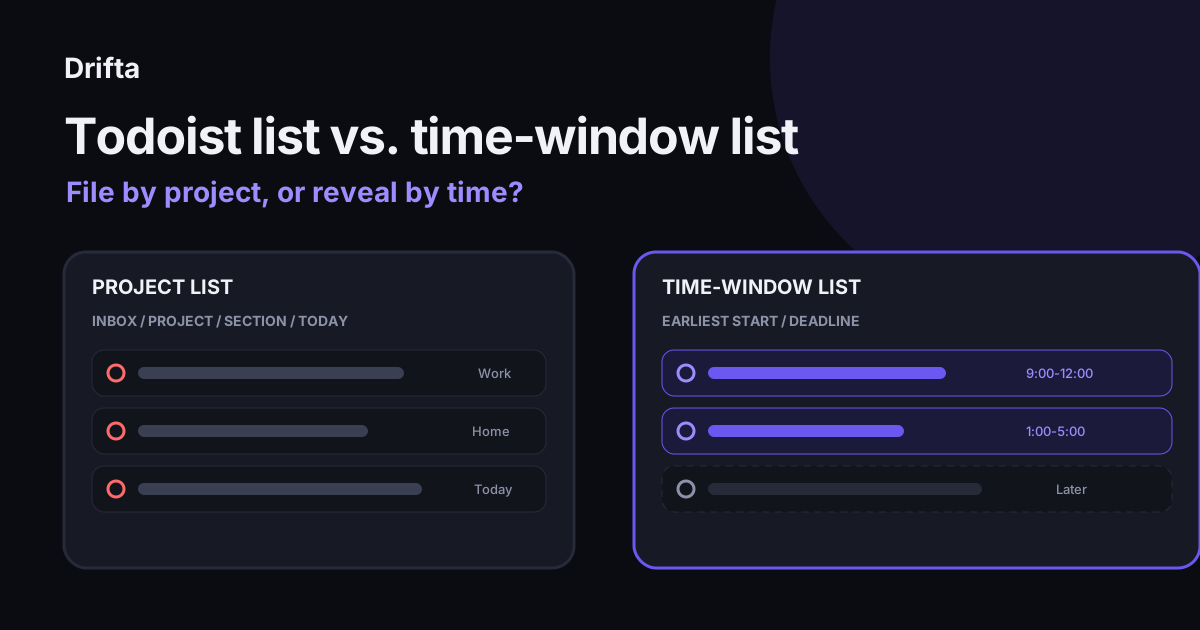
A Todoist list organizes tasks by container and query: Inbox, projects, sections, Today, Upcoming, and filters. A time-window list organizes tasks by when they become actionable, using an earliest start and deadline. Choose Todoist when projects and cross-platform views matter most; choose a time-window list when seeing tasks too early creates noise.
A Todoist list organizes tasks by where they belong and which query includes them: Inbox, projects, sections, Today, Upcoming, and filters. A time-window list organizes tasks by when they become actionable, using an earliest start and a deadline. Todoist fits project-heavy, cross-platform work; a time-window list fits people who want future tasks kept out of today's view.
This comparison stays with two list models. The useful question is what happens after capture. One model asks you to file and query a task. The other asks when the task should first become visible.
What counts as a Todoist list?
"Todoist list" can refer to several different surfaces. Todoist's official help center calls the Inbox the default task list. A project is a list you create, sections divide that project, and Today gathers dated tasks from every project. Filters calculate a custom view from criteria such as date, project, label, priority, or creation date.
| Surface | Question it answers | What you maintain |
|---|---|---|
| Inbox | What did I capture? | Process or move each item |
| Project | What belongs to this outcome or area? | Project membership |
| Section | Which phase or subgroup? | Section membership |
| Today | What carries today's date? | Dates and rescheduling |
| Filter | Which tasks match this query? | Labels, dates, priorities, and query syntax |
According to Todoist's current help pages, the Beginner plan allows up to 5 active personal projects, and each project can contain up to 20 sections. That creates a theoretical 100 section slots before counting Inbox, labels, or filters. Capacity is generous. The practical question is how many containers you will keep current.
How does a time-window list choose what you see?
A time-window list starts with timing rather than project membership. Each task can have an earliest start, a deadline, or both. Before the start, the task waits outside the working list. Once the window opens, it becomes actionable. After the deadline, its reminder can become firmer.
Drifta uses three built-in lists: Daily Tasks, Up Next, and Backlog. Its free version allows up to 10 daily tasks. If 12 tasks exist and only 4 can be worked on today, the useful daily count is 4, while the other 8 wait in Up Next or Backlog. The 10-task allowance acts as a ceiling rather than a reason to fill the screen.
This model answers a different question from a project list. A project says which body of work owns the task. A window says when your attention should meet it. Some people need both answers; the apps simply put their weight in different places.
What happens to the same 12 tasks in each system?
Use one sample list: submit a travel reimbursement, renew renter's insurance, draft an agenda for a budget review, confirm a vet appointment, ship an online return, restock coffee filters, change the bedsheets, call a plumber, sketch a fourth-quarter campaign, buy a bike light, respond to a neighborhood survey, and compare internet plans.
In a simple Todoist setup, all 12 land in Inbox. Seven then move into Work, Home, or Personal projects. Four receive today's date, three receive later dates, and five remain undated. Todoist's help page states, "Only tasks with a date appear in Today and Upcoming." The undated five stay in their projects or require a filter to reappear together.
In the time-window version, four tasks enter Daily Tasks because their windows are open. Three sit in Up Next with future starts. Five remain in Backlog because no useful date exists yet. Both systems store all 12; the maintenance differs.
| Action after capture | Todoist example | Time-window example |
|---|---|---|
| Visible for action today | 4 dated tasks in Today | 4 tasks with open windows |
| Future work | 3 tasks with later dates | 3 tasks in Up Next |
| Unscheduled work | 5 undated tasks in projects | 5 tasks in Backlog |
| Extra classification | 7 project moves | 8 start or backlog choices |
The counts finish close because the example is controlled. The felt difference arrives tomorrow. Todoist Today changes when dates change. A time-window list changes when windows open. If you repeatedly postpone a dated task, the first model asks for another date; the second can leave the task available inside a wider range.
Which list takes less weekly upkeep?
Weekly upkeep depends on the structure you actually use. A Todoist user with one Inbox, three projects, and a Today view may have very little upkeep. A setup with nested projects, 20 sections, labels, and custom filters needs more review because each extra field can become stale.
A time-window list moves some upkeep to capture. Setting a realistic earliest start takes longer than tossing a task into Inbox. The return is fewer future tasks competing for attention today. If most tasks are easy to classify by project and hard to predict by time, Todoist's structure may be cheaper. If early visibility is the main source of noise, time windows may save more decisions.
Cutting decisions out of a task list gives a useful test: count every choice the system asks you to repeat. A list maker that needs less upkeep applies the same test to the daily work of sorting and rescheduling.
When is a Todoist list the better fit?
A Todoist list is the better fit when you need the same task system on iPhone, Android, Mac, Windows, Linux, and the web, or when projects, shared work, sections, and filters are central to how you think. Its official pricing page lists reminders, flexible list and board layouts, 5 personal projects, and 3 filter views on the free Beginner plan.
Todoist also fits fast capture followed by deliberate processing. The Inbox gives every thought one reliable landing place, and projects can carry far more structure than a three-list system. That breadth is useful when you have several clients, a team, or many multi-step projects.
For a different use of the same app, the Todoist time-blocking worked example shows how durations and calendar blocks behave across one day.
When is a time-window list the better fit?
A time-window list is the better fit when the main problem is seeing tasks long before you can act on them, then tuning them out by the time they matter. Drifta is iPhone-only, keeps tasks on the device, and has no Android, Mac, or web version. That narrower platform support is a real tradeoff.
Drifta's free daily limit gives the comparison a concrete boundary. Ten daily slots can hold 3 priorities and 7 smaller actions. Everything else can wait in Up Next or Backlog until its time window opens. That model avoids maintaining a large filter vocabulary, while giving up Todoist's cross-platform reach and deeper project structure.
Try either model with the same 12 real tasks for seven days. Count reschedules, classification changes, and minutes spent reviewing. Keep the one that gives you a believable next task with less repair work.
Common questions
What is a Todoist list?
A Todoist list can mean the Inbox, a project shown in list layout, or a calculated view such as Today or a filter. The Inbox catches unfiled tasks, projects group related work, sections divide a project, and Today collects dated tasks from across projects.
Can Todoist show every task in one list?
Todoist can show broad sets of tasks through search and filters, and its official print guide points to a View all filter. A very broad list is useful for review, but it can be noisy for daily execution, so pair it with a narrower Today or custom filter view.
Is Todoist or Drifta better for ADHD?
Todoist fits people who want cross-platform projects, sections, filters, and collaboration. Drifta fits an iPhone user who wants each task to stay quiet until an earliest start and then become firmer near a deadline. The better fit depends on which daily friction costs you more.
Can a Todoist list use time windows?
Todoist has dates, deadlines, durations, reminders, and calendar views, but its official task model does not use Drifta's paired earliest-start and deadline window. You can approximate one with labels or filters, though that adds setup and a query you must maintain.
This article shares practical organizing ideas. It is not medical advice. For diagnosis or treatment questions, talk with a qualified clinician.