Best application for a to-do list: a seven-day test
Drifta is an iPhone task app for ADHD that gives every task its own time window.
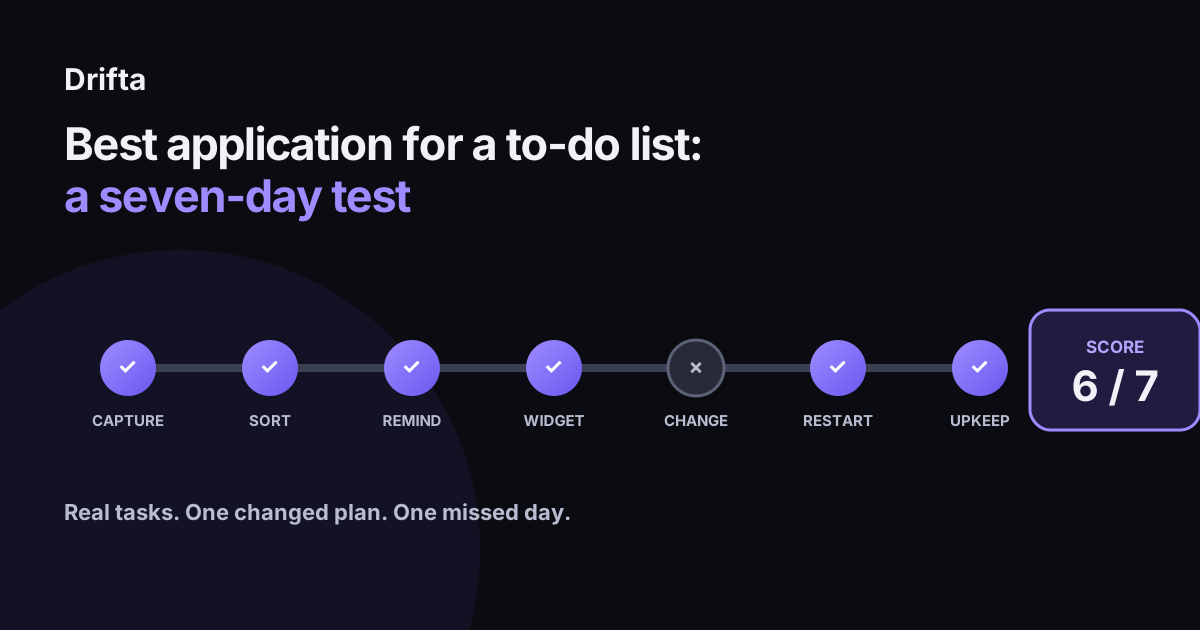
The best application for a to-do list is the one that passes a seven-day test with your real tasks. Load a small sample, test capture and reminders, use its widget, change a plan, recover from one missed day, and measure cleanup time. Keep it if it passes at least five of seven checks and no important reminder fails.
The best application for a to-do list is the one that passes a seven-day test with your real tasks. Load a small sample, test capture and reminders, use its widget, change a plan, recover from one missed day, and measure cleanup time. Keep it if it passes at least five of seven checks and no important reminder fails.
What should you prepare before the seven-day test?
The seven-day test needs a backup, 12 real tasks, and one written reason for trying a different app. Export your current list if the product allows it, or save screenshots that include titles, dates, notes, and recurring settings. Leave the old app installed and notifications on until the trial is over.
Choose three tasks from each of four groups: fixed-time commitments, flexible errands, repeating chores, and project work with a concrete next action. Twelve tasks are enough to expose different behavior while keeping the migration recoverable. A raw brain dump should be sorted before it enters the trial; what to do after a brain dump gives each item a next step instead of importing a wall of vague text.
What does the app need to prove on day one?
On day one, the app needs to prove that capture works in the places where tasks actually occur to you. Add five small tasks from five contexts: sitting at your desk, walking, inside another app, from the Lock Screen, and with one hand. Use voice or a shortcut if that is part of your normal plan.
Set a 60-second total target for the five plain tasks, then note where you hesitate. This guide uses that target as a practical heuristic; no published standard sets it. A failure means at least one thought never reaches the inbox, the app loses a detail you need, or the total exceeds a minute because routine fields keep interrupting capture.
How should you test sorting on day two?
Day two should prove that the application can show a small current list without hiding the rest forever. Sort the 12 tasks into Today, Next, and Later, or the app's nearest equivalents. Then close the app and reopen it without using search.
Pass the day if you can find today's three most useful actions within ten seconds and still locate one Later item when asked. If every task remains on one screen, check whether filters require daily handwork. The Today, Next, Later system explains why the current list needs a boundary instead of becoming a smaller copy of the backlog.
Which reminders should you test on day three?
Day three should test three reminder shapes: one fixed time, one flexible time window, and one prompt you deliberately ignore. Give the fixed reminder to an appointment. Give the window to an errand that can happen during business hours. Use a harmless household task for the ignored prompt.
Record what the app does after each alert. Does the fixed item stay visible? Can the flexible task appear when it becomes possible and remain available until its deadline? Does the ignored item vanish, repeat, or wait for you to reschedule it? Pass when all three outcomes match what you intended before the alerts fired.
How should the widget perform on day four?
On day four, the widget should surface a useful current task without making you open and navigate the full application. Apple Support says the Reminders widget can complete items “from the Home Screen without opening the Reminders app.” That makes a concrete benchmark for any iPhone to-do list widget.
Add the candidate's widget to the Home Screen or Lock Screen and use only that surface for one morning. Count the glances that help, stale items, and taps that land in the wrong place. Pass if the widget shows a relevant item and either completes it directly or opens the exact task. Give a large logo or an unchanging count zero credit.
What changed plan should you run on day five?
Day five should prove that a changed plan takes less work to repair than to ignore. Move one task from today to tomorrow, delay another by two hours, and turn a third into a smaller next action. Time the entire repair.
Pass if all three changes take under two minutes and leave no duplicate alerts behind. Again, two minutes is a test threshold chosen for this guide. The important evidence is the finished state: tomorrow's list should be correct, today's list should be shorter, and the smaller action should carry the original note or context.
How do you test a bad day on day six?
Day six should prove that the to-do list has a clear way back after you miss a day. Leave two low-consequence tasks incomplete overnight. The next morning, open the app and notice whether it gives you a readable choice or a red wall of overdue items.
Pass if you can keep, move, or delete both tasks in under three minutes without rebuilding the whole plan. This check matters because a trial made only of tidy mornings rewards setup polish. Real systems meet changed energy and missed work. If too many options block the restart, removing decisions from the task list is more useful than adding another priority level.
How do you score the application on day seven?
Day seven scores the application with seven yes-or-no checks and one safety rule. Give one point for each pass. Keep the candidate at five points or more only when no important reminder failed; a missed high-consequence task overrides the total.
| Test | Pass condition | Example score |
|---|---|---|
| Capture | Five tasks captured in 60 seconds, none lost | 1 |
| Sort | Today's actions found in 10 seconds | 1 |
| Remind | Three reminder shapes behave as planned | 1 |
| Widget | Shows or opens the relevant task | 1 |
| Change | Three plan changes fixed in 2 minutes | 0 |
| Restart | Two missed tasks resolved in 3 minutes | 1 |
| Upkeep | Final cleanup takes 10 minutes or less | 1 |
| Total | Five required, plus safety rule | 6 / 7 |
The example app earns 6 out of 7. Its plan-change flow missed the two-minute mark, so that is the tradeoff to decide on. The score records how one application handled one person's week; it makes no claim about everyone else's.
When should you test Drifta with this method?
Drifta is worth this test when your main problem is timing a personal task on iPhone rather than coordinating a team project. Each task can have an earliest start and a separate deadline, and the free version allows up to 10 daily tasks. Twelve trial tasks can still fit when no more than 10 are assigned to the same day.
The current Pro price is $4.99 monthly or $29.99 yearly. Twelve monthly payments total $59.88, so the annual option is $29.89 less across a full year. Wait until day seven to make that choice. A price comparison cannot rescue an app that failed your reminder or restart test, and a passed free-tier trial is better evidence than a discount.
What should you move after the trial?
After the trial, move only active tasks, repeating commitments, and the next action from each current project. Archive or leave dormant ideas in the old system until you review them separately. This keeps migration from turning an app decision into a full backlog-cleaning weekend.
Recheck the score after 30 days. Capture and widgets may remain easy while upkeep grows, or the reminder style may prove stronger than it looked in week one. The second score tells you whether the application became part of the day or another list you maintain out of obligation.
Common questions
What is the best application for a to-do list?
The best application is the one that reliably captures your tasks, brings them back at the right time, stays visible where you work, and remains easy to maintain after the first week. A seven-day test shows that better than an app-store feature list.
How many tasks should I use in an app trial?
Start with 12 real tasks across four types: fixed appointments, flexible errands, repeating chores, and larger work with a next action. That is enough variety to expose gaps without risking your whole backlog.
What score should a to-do list app pass?
This guide uses a practical rule of five passes out of seven, with no failed reminder for a task that carries real consequences. This is a testing heuristic; no published clinical or usability standard sets that threshold.
Should I move my entire to-do list into a new app?
No. Back up the old list and move only the test set first. Transfer the rest after the app survives a changed plan, a missed day, and the final cleanup check.
This article shares practical organizing ideas. It is not medical advice. For diagnosis or treatment questions, talk with a qualified clinician.