Task tracking apps: the weekly upkeep math
Drifta is an iPhone task app for ADHD that gives every task its own time window.
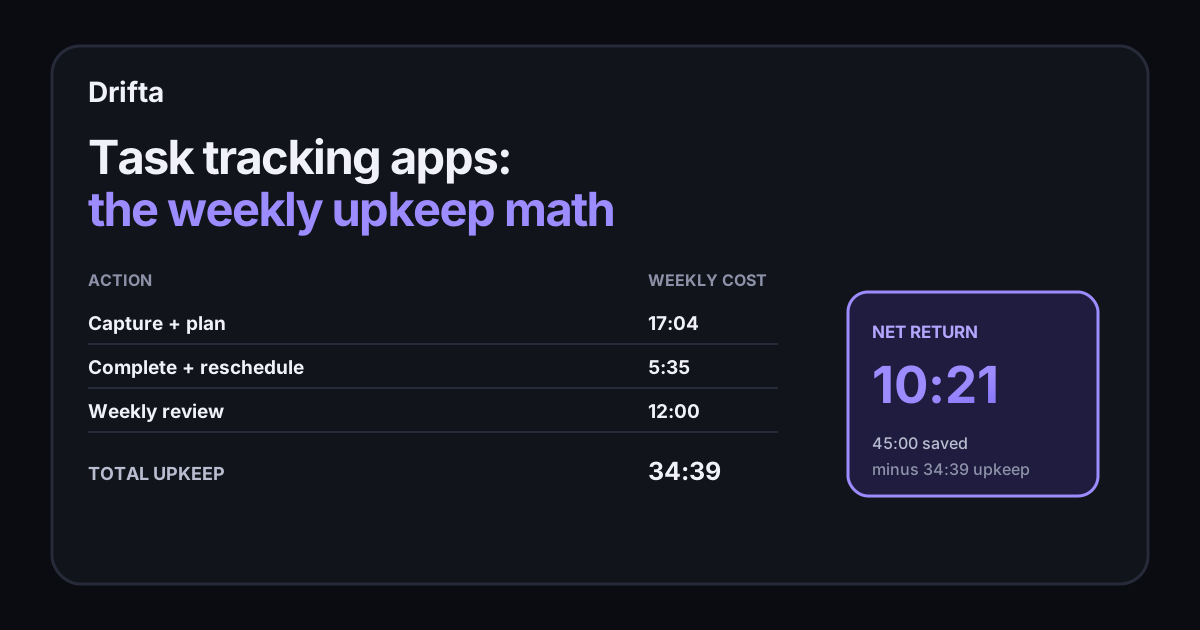
Task tracking apps pay off when the time or mistakes they save exceed the work needed to keep them current. Measure four numbers for one week: capture time, update time, rescheduling time, and review time. In the worked example below, tracking costs 34 minutes 39 seconds, avoids 45 minutes of reconstruction and searching, and returns a net 10 minutes 21 seconds.
Task tracking apps pay off when the time or mistakes they save exceed the work needed to keep them current. Measure four numbers for one week: capture time, update time, rescheduling time, and review time. In the worked example below, tracking costs 34 minutes 39 seconds, avoids 45 minutes of reconstruction and searching, and returns a net 10 minutes 21 seconds.
What are task tracking apps supposed to improve?
Task tracking apps should improve your ability to resume work, see the next action, and keep a commitment from disappearing. A personal task manager, a team project board, and a time tracker may all contain tasks, but each carries a different kind of state. Personal apps answer what you can do next. Team tools answer who owns the work and what other work depends on it. Time trackers answer where the minutes went.
The cost arrives whenever you add, classify, update, move, or review an item. The return arrives when the record saves you from searching, reconstructing context, repeating a decision, or missing a handoff. This post measures that trade instead of ranking feature lists. For a feature-level selection framework, the eight questions for choosing a task app cover timing, reminders, privacy, and capacity.
Why should task switching count in the calculation?
Task switching belongs in the calculation because a tracking system can either preserve your place or become another interruption. The American Psychological Association's summary of switching-cost research reports that people lost time on every switch in the cited experiments. It also quotes researcher David Meyer saying brief mental blocks can cost “as much as 40 percent” of productive time when switching repeats.
Switching costs remain, and a task manager can leave a useful restart point: the file to open, the reply still needed, or the next physical action. That information reduces reconstruction after a switch. A tracker that makes you visit several fields before saving creates fresh overhead, so both sides belong in the ledger.
How do you measure one week of tracking overhead?
One week of tracking overhead is the sum of every minute spent maintaining task state rather than doing the task. Use a stopwatch for a representative sample, count how often each action happens, and multiply. Round only after the final total so small repeated actions do not disappear.
Here is a sample week for one person handling 32 captured tasks, 18 completions, and 7 changed plans. The timings are measured-example inputs, clearly separated from published research, so you can replace each number with your own.
| Tracking action | Count × time | Weekly cost |
|---|---|---|
| Capture a task | 32 × 12 seconds | 6 min 24 sec |
| Add list, owner, or time | 32 × 20 seconds | 10 min 40 sec |
| Mark a task complete | 18 × 5 seconds | 1 min 30 sec |
| Reschedule a changed task | 7 × 35 seconds | 4 min 5 sec |
| Weekly review | 1 × 12 minutes | 12 min |
| Total | 34 min 39 sec |
The arithmetic is 384 + 640 + 90 + 245 + 720 seconds, or 2,079 seconds. Divide by 60 and the weekly upkeep is 34 minutes 39 seconds. Repeated over 48 working weeks, that becomes 27 hours 43 minutes. Now the app has a cost you can compare with its return.
How do you calculate what the tracker gives back?
The tracker's return is the time you can credibly connect to having a current record. Keep the estimate conservative. Count an avoided search only when the task contained the link or file you otherwise had to find. Count an avoided reconstruction only when a saved next step let you resume without rereading the whole thread.
In the same sample week, the task record prevents one 20-minute project reconstruction after a two-day interruption, one 15-minute search for a client detail, and one 10-minute duplicate status check. The gross return is 45 minutes. Subtract the 34 minutes 39 seconds of upkeep and the net return is 10 minutes 21 seconds.
| Result | Minutes |
|---|---|
| Credible time returned | 45:00 |
| Tracking upkeep | 34:39 |
| Net weekly return | 10:21 |
One negative week can come from setup work, and a missed deadline can matter more than the minutes involved. Ask if the fields you maintain change an action or protect a commitment. Remove any field that does neither.
Which fields earn their upkeep?
A field earns its upkeep when it changes what you do next or helps another person act without asking you for context. For a personal list, title, next action, earliest start, and deadline can be enough. A team task may need owner, status, dependency, and a link to the source material. A time tracker needs a duration or running timer because elapsed time is its purpose.
Custom labels, priorities, estimates, and notes can help, but each should pass the same test: name the decision this field changes. A priority field that never affects sorting is decoration. A label used only during a monthly cleanup is probably too expensive. The distinction between a lean personal app and a configurable manager is explored in simple versus powerful task apps.
Where does Drifta fit in this task tracking math?
Drifta fits as a personal iPhone task manager whose core tracked state is when a task becomes actionable and when its deadline arrives. It also keeps completed tasks in a progress view. Team ownership stays on the team board, and elapsed work belongs in a time tracker. Copying a whole client project into Drifta would duplicate the shared system.
A narrower use is cheaper: keep the authoritative project in the company tool, then put only your concrete next action in Drifta with a realistic time window. That approach avoids copying every comment and status field. If you tend to build a detailed new setup and leave it two weeks later, task-app abandonment explains why reducing maintenance is part of choosing the tool.
When should you stop tracking a field?
You should stop tracking a field after two review cycles in which it changes no decision and protects no handoff. Remove one field at a time, then watch for a week. If nothing gets harder to start, resume, estimate, or communicate, the field was upkeep without a return.
Keep the ledger simple enough to repeat once a quarter: weekly upkeep, credible time returned, and one consequence the system prevented. Those three lines reveal more than a long comparison chart because they measure the app inside your actual work.
Common questions
What should a task tracking app track?
A personal task tracking app should at least keep the task, its current state, and the time boundary that makes it actionable. Team tools may also need owners, comments, dependencies, and an audit history, while time trackers need elapsed minutes.
How do I calculate the upkeep cost of a task manager?
Time capture, planning, completion updates, rescheduling, and the weekly review for seven days. Add those minutes together, then compare the total with time saved from fewer searches, repeated decisions, missed handoffs, or reconstructed work.
Is more task data always better?
No. Each field creates entry and review work. Keep a field only when it changes a decision, such as who owns the task, when it can start, when it is due, or how long similar work should take.
When should I use a team task manager instead of a personal app?
Use a team manager when other people need a shared source of truth for ownership, status, comments, or dependencies. Use a personal app for your next actions, but keep the team system updated rather than building a competing record.
This article shares practical organizing ideas. It is not medical advice. For diagnosis or treatment questions, talk with a qualified clinician.